This guide was researched and drafted with AI assistance, then reviewed and fact-checked by our editorial team. Recommendations are based on manufacturer specifications, expert sources, and verified buyer feedback — not hands-on testing by Trusted Buyer Report. We may earn a commission when you use our links. Full disclosure →
Quick Verdict (TL;DR)
- Best 1080p overall: Elgato Facecam MK.2 — unmatched image quality at 1080p, but needs an external mic
- Best 4K / serious streaming: YoloLiv YoloCam S7 — micro four-thirds sensor puts it in a different league
- Best all-in-one for remote work: Dell Pro Webcam — solid 2K QHD with a genuinely good built-in mic
- Best budget 2K: Anker PowerConf C200 2K — reliable upgrade from a laptop camera under $60
- Best PTZ / movement tracking: OBSBOT Tiny 3 — face tracking, excellent color, magnetic mount
- Avoid in 2026: Logitech C920 (14 years old), Emeet SmartCam S800 (poor color science despite 4K claim)
The Misconception That Costs Webcam Buyers Money
Most people shopping for a webcam in 2026 do the same thing: they sort by resolution and pick the highest number they can afford. That's the wrong move — and it costs buyers real money every year.
Resolution tells you how many pixels a sensor captures. It tells you nothing about color accuracy, low-light performance, lens quality, or image processing. A poorly tuned 4K webcam can look noticeably worse on a video call than a well-engineered 1080p camera. Several popular budget models prove this point every day on Teams and Zoom calls across the country.
Here's what actually matters when evaluating a webcam:
| Factor | Why It Matters |
|---|---|
| Sensor size | Larger sensors capture more light, produce cleaner images in low-light |
| Color science | Determines whether skin tones look natural or artificial/green |
| Lens quality | Sharper lenses resolve more detail; cheap lenses add distortion |
| Low-light performance | Most home offices are not perfectly lit — this matters daily |
| Frame rate | 60fps at 1080p looks smoother than 30fps at 4K on most streaming platforms |
The second misconception worth killing immediately: the Logitech C920 is still a reasonable choice in 2026. It is not. Wired is blunt about this — the C920 is 14 years old, and none of its variants (C920x, C920S, C920e) improve the underlying image quality. At its current price point, you can buy a 2K camera with better color science and low-light performance. If you own a C920, this guide will help you identify what to replace it with. If you were about to buy one, keep reading.
Why Your Webcam Matters More Than You Think
One in four paid workdays in the United States now happens outside a traditional office — a figure from Stanford economist Nick Bloom's WFH Research group, stable across multiple independent data sources for over two years. Remote work is a permanent structural feature of the US workforce, not a pandemic-era anomaly.
That means your webcam is not a temporary accessory. It's a professional tool you'll use hundreds of times a year.
Your video presence is often the first impression you make on colleagues, clients, and interviewers. A pixelated freeze-frame during a job interview or a washed-out face on a client call communicates something about your setup before you speak. That perception is unfair — but it's real, and a quality webcam is one of the few purchases that pays off on every single workday.
For streamers and content creators, the dynamic is different but equally concrete. Audience expectations for video quality have risen sharply as the creator economy has matured. A blurry or over-processed image signals low production value before a word is spoken.
There's also a growing segment that most webcam guides almost entirely ignore: the person who takes video calls during the day and streams or records content in the evenings. This dual-use profile needs a camera that performs well across variable lighting without manual reconfiguration between sessions. Most guides optimize for one use case. This one addresses both.
Planning your full home office setup? See our 2026 Consumer Electronics Buyer's Guide for a complete framework covering monitors, peripherals, and audio gear.
How to Match a Webcam to Your Actual Use Case
Before evaluating any specific model, identify which profile fits your situation. Buying the wrong camera for your use case is more common than buying a bad camera.
Remote Work / Video Calls Only
You need reliable autofocus, good low-light performance, a built-in microphone, and consistent color accuracy. You do not need 4K. Video conferencing platforms (Zoom, Teams, Google Meet) compress footage aggressively, and the difference between 1080p and 4K is largely invisible on the receiving end. Prioritize cameras with a good all-in-one package — a decent built-in mic saves you a separate purchase.
Streaming or Content Creation Only
Image quality and color accuracy are your top priorities. Audio can — and should — come from an external microphone if you're serious about production value. Frame rate matters: 60fps is preferable for gaming streams and fast-moving content. Check what your streaming platform actually supports before prioritizing 4K.
Dual Use — Calls by Day, Streaming by Night
The most underserved profile. You need a camera that handles both the static, close-framed look of a video call and the slightly wider, more dynamic framing of streaming. Software customization — the ability to save profiles or apply presets — becomes genuinely valuable here.
Budget-Constrained Buyer
The real floor of acceptable quality in 2026 is higher than it was two years ago. There are solid 2K options under $60 that outperform the C920. The compromise to avoid at all costs: poor color science. A camera that makes you look green or waxy will frustrate you every single day, regardless of its resolution number.
PTZ (Pan-Tilt-Zoom) Users
PTZ webcams have become, as Wired describes them, "the latest hotness in home office cameras." If you use a standing desk, move around during calls, or want dynamic framing without manually repositioning your camera, a PTZ model solves a real problem — and at a price that no longer requires justification.
The 7 Best Webcams in 2026, by Use Case
1. Best 1080p Webcam: Elgato Facecam MK.2
Best for: Streamers, content creators, podcasters, and remote workers who already have an external mic and want the cleanest 1080p image available.
PC Gamer names the Elgato Facecam MK.2 the best overall webcam, with clear rationale: "If you don't feel the need for 4K, then the Facecam MK.2 is the best webcam around." That's not faint praise — it reflects a camera that has been tested against the full field and consistently delivers the best 1080p image in its class.
What sets it apart: The Camera Hub software gives you manual control over exposure, white balance, sharpness, and more — parameters most webcam software locks away. The HDR mode is a meaningful differentiator for anyone dealing with a bright window behind them: it retains detail in high-contrast scenes that would blow out or underexpose on lesser cameras.
The critical caveat: The Facecam MK.2 has no built-in microphone. This is a deliberate design choice — the camera prioritizes image quality and assumes you have a dedicated USB mic or headset. If you don't already own one, budget for it. A USB mic in the $50–$80 range produces better audio than any webcam mic anyway, so the total investment makes sense for serious users.
Skip it if: You want a single plug-and-play device with no additional purchases required.
Pros: Best-in-class 1080p image, full manual controls, HDR mode, compact design
Cons: No built-in microphone, higher price point for 1080p
2. Best 4K Webcam for Streaming: YoloLiv YoloCam S7
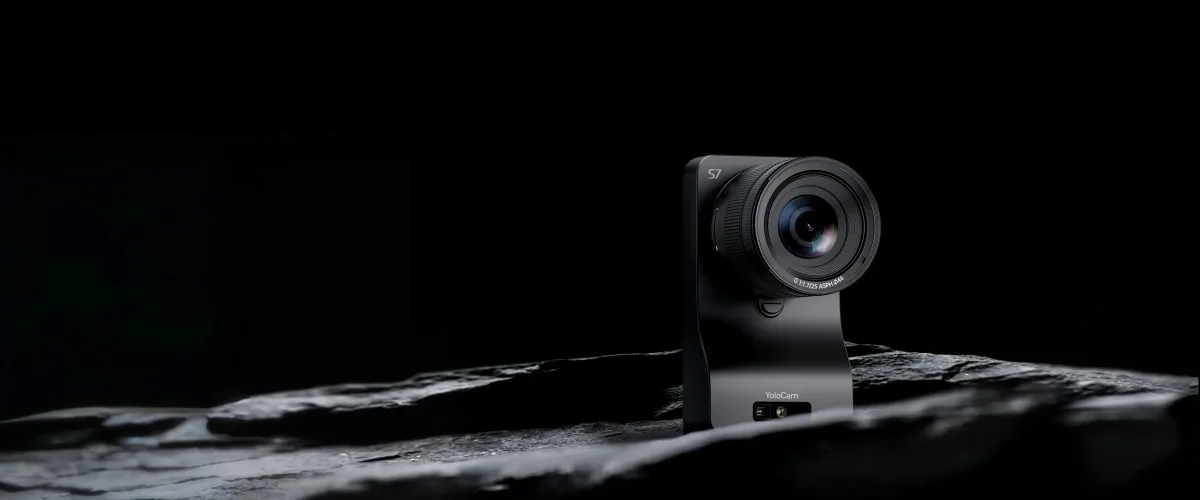
Best for: Serious content creators and streamers building a full professional setup who want camera-quality footage from a webcam form factor.
If you want the best possible image quality from a webcam in 2026, the YoloCam S7 is in a genuinely different category from everything else. Stream Tech Reviews calls it "the new best webcam out by an insane margin" — language that reflects a real hardware leap, not marketing copy.
The reason is the sensor. The YoloCam S7 uses a micro four-thirds sensor — the same format found in serious mirrorless cameras from Olympus and Panasonic. No other webcam comes close in sensor size. Larger sensors capture dramatically more light, produce shallower depth of field (that cinematic background blur), and handle low-light conditions far better than the small sensors in conventional webcams.
The interchangeable lens system is unprecedented for a webcam. You can swap lenses to change focal length, depth of field, and field of view — flexibility that previously required a full camera rig. YoloLiv now offers a bundled lens option, which is the most cost-effective way to start.
Limitations worth understanding:
- No internal microphone — requires an external mic
- No privacy shutter (matters for remote workers who want physical assurance the camera is off)
- Requires HDR mode to look its best; image can appear flat without it
- This is a camera for serious creators building a full setup, not a plug-and-play solution
Pros: Micro four-thirds sensor (unmatched in class), interchangeable lenses, exceptional low-light performance, cinematic depth of field
Cons: No built-in mic, no privacy shutter, requires thoughtful setup, premium price
3. Best All-in-One for Remote Work: Dell Pro Webcam
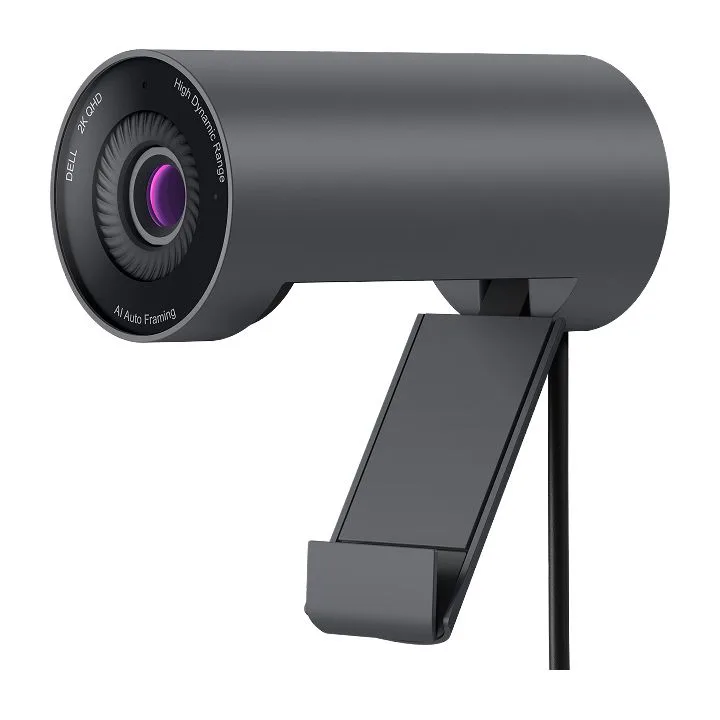
Best for: Remote workers who want meaningfully sharper than 1080p, a good built-in mic, and a clean single-device setup — without the complexity or cost of a 4K rig.
PCMag makes the recommendation direct: the Dell Pro Webcam is their "default recommendation for anyone who wants sharper-than-1080p picture quality" at its price point. That's a meaningful endorsement in a crowded category.
2K QHD resolution (2560×1440) produces noticeably sharper video than standard 1080p — faces are more defined, text on a shared screen is more legible, and the overall impression on a video call is a visible step up from what most people are used to. The gap between 2K and 4K, by contrast, is largely invisible in video conferencing contexts.
What makes it stand out for remote workers: The built-in microphone is notably good for a webcam — PCMag describes it as sounding "pretty good," which clears a bar that most webcam mics don't reach. Windows Hello facial recognition support adds practical value for users who log in frequently. The 78-degree field of view suits standard desk setups without feeling cramped.
Available at Dell, Amazon, and Walmart in the $100–$120 range.
Pros: 2K QHD resolution, genuinely good built-in mic, Windows Hello support, clean all-in-one design
Cons: Not the right choice for streamers who want maximum image quality; no 4K
Setting up your monitor alongside your webcam? Our Best PC Monitors for 2026: Work, Design & General Use covers the displays that pair best with a quality webcam setup.
4. Best Budget Webcam (Under $60): Anker PowerConf C200 2K
Best for: Buyers who need a reliable upgrade from a laptop camera without significant spend.
Wirecutter names the Anker PowerConf C200 2K their budget pick, describing it as "small and solidly built" with "respectable footage without any fuss." At around $50–$60, it delivers 2K resolution at a price point that removes the barrier to entry for anyone still on a built-in laptop camera.
It won't match the Dell Pro Webcam in overall image quality or software sophistication — but for the buyer who needs a reliable, compact upgrade and doesn't want to overthink it, this is the starting point.
Pros: 2K resolution at an accessible price, compact and solid build, plug-and-play simplicity
Cons: Image quality behind pricier options; limited software controls
5. Best PTZ Webcam: OBSBOT Tiny 3
Best for: Standing desk users, active streamers, and anyone who finds a static locked-off frame limiting.
For users who need a camera that tracks their movement, the OBSBOT Tiny 3 is the strongest PTZ option currently available. Stream Tech Reviews highlights its physical pan, tilt, and digital zoom with face tracking, excellent colors, snappy autofocus, and a magnetic monitor mount that makes repositioning easy.
The one notable omission is a privacy shutter — a consideration for privacy-conscious remote workers.
Pros: Physical PTZ with face tracking, excellent color accuracy, snappy autofocus, magnetic mount, flexible framing
Cons: No privacy shutter; premium price relative to static webcams
6. Best Overall Pick (Runner-Up): Logitech Brio 505
Best for: Remote workers who want a reliable, well-rounded camera from a widely supported brand with strong platform compatibility.
Wirecutter's primary recommendation for most buyers. The Brio 505 offers features that are usually reserved for webcams twice its price, with strong Logitech driver stability across Windows and macOS. It's a well-rounded performer that suits remote workers who want reliability above all else.
Pros: Strong platform support, reliable autofocus, good low-light performance, Logitech's software ecosystem
Cons: Not the top performer in any single category at this price; some users find Logitech's software heavy
7. Best for Vertical Video / Portrait Streaming: Logitech StreamCam
Best for: Creators producing content for mobile-first platforms (TikTok, Instagram Reels, YouTube Shorts) where portrait video is standard.
PCMag identifies the Logitech StreamCam as the best option for vertical video, with 1080p at 60fps and flexible mounting options for both portrait and landscape orientation. Most other webcams don't accommodate portrait orientation natively — this one does.
Pros: Native portrait orientation, 1080p at 60fps, flexible mounting
Cons: 1080p only (no 2K/4K); primarily suited to portrait-format content
Also Worth Knowing: Insta360 Link 2 Pro
Wirecutter's upgrade pick for buyers who want high-end image quality and are willing to pay for it. The Link 2C Pro variant offers the same image quality and specs but adds a privacy shutter while removing PTZ controls — a worthwhile trade-off for remote workers who prioritize physical privacy over dynamic framing.
Webcams to Avoid in 2026
Two cameras come up repeatedly in testing as poor value in 2026:
Logitech C920 (and all variants: C920x, C920S, C920e)
Still widely sold, but 14 years old. Wired is unambiguous: none of the variants improve the basic image quality. At its current $60–$80 price, you can do significantly better. The C920 was an excellent camera for its era — that era is well past.
Emeet SmartCam S800
Tempting on paper: 4K resolution at a budget price. In practice, Wired found the color accuracy "rough" out of the box, with an overly green cast and an over-sharpened effect that produced a "fake digital effect" that software adjustment could not fully resolve. Four thousand pixels of an artificially green face is not an upgrade from a well-tuned 1080p camera.
Decision Framework: Which Webcam Should You Buy?
| Your Profile | Recommended Camera | Key Reason |
|---|---|---|
| Best 1080p, have external mic | Elgato Facecam MK.2 | Best-in-class 1080p image, HDR mode, full manual controls |
| Serious streamer / content creator | YoloLiv YoloCam S7 | Micro four-thirds sensor, interchangeable lenses, unmatched quality |
| Remote worker, want all-in-one 2K | Dell Pro Webcam | 2K QHD, good built-in mic, Windows Hello |
| Budget buyer, under $60 | Anker PowerConf C200 2K | Reliable 2K at the lowest acceptable price point |
| PTZ / movement tracking needed | OBSBOT Tiny 3 | Physical PTZ, face tracking, excellent color |
| Dual use, want versatility | Logitech Brio 505 or OBSBOT Meet 2 | Well-rounded performance across calls and content |
| Vertical video / portrait streaming | Logitech StreamCam | Native portrait orientation, 1080p at 60fps |
One final point on lighting: No webcam fully compensates for poor ambient light. If your room is dark or backlit, a $25–$40 ring light or a desk lamp repositioned to face you will improve your image more than upgrading from a mid-range to a premium webcam. Get your lighting right first — then choose the camera that fits your use case and budget.
Frequently Asked Questions
Is the Logitech C920 still worth buying in 2026?
No. It is 14 years old, and none of its variants improve the underlying image quality. At its current price, there are multiple 2K cameras with better color science and low-light performance. The C920 was excellent for its era — that era has passed.
Do I need 4K for video calls?
No. Most video conferencing platforms compress footage significantly, and the difference between 1080p and 4K is largely invisible on the receiving end. For calls, 1080p or 2K is sufficient. 4K becomes relevant for recorded content, streaming to platforms that support it, or situations where you need to crop your frame in post-production without losing resolution.
Should I get a webcam with a built-in microphone or use a separate mic?
For casual video calls, a good built-in mic (like the Dell Pro Webcam's) is perfectly adequate and saves desk clutter. For content creation, podcasting, or anyone who cares about audio quality, a dedicated USB microphone will always outperform any webcam mic — and the Elgato Facecam MK.2's decision to omit a mic entirely reflects that reality.
What's the difference between 1080p, 2K, and 4K for webcams?
- 1080p (Full HD): Sufficient for all video calls; the performance gap between 1080p cameras varies enormously based on sensor and lens quality.
- 2K (QHD, 1440p): Noticeably sharper than 1080p; the sweet spot for remote workers who want a visible quality upgrade without the cost and complexity of 4K.
- 4K (UHD): Meaningful for content creation and streaming, but only from cameras with sensors that justify the resolution. A 4K camera with a poor sensor is worse than a well-tuned 1080p camera.
Do I need a ring light with my webcam?
Not necessarily — but if your space is dark, backlit, or relies on overhead fluorescent light, a basic ring light ($25–$40) will improve your image quality more than any webcam upgrade. Lighting and camera quality work together. Good light makes an average camera look decent; poor light makes an excellent camera look bad.
What webcam is best for both remote work and streaming?
The Logitech Brio 505 and OBSBOT Meet 2 are the strongest dual-use options. Both perform reliably across variable lighting without significant manual adjustment between sessions. The OBSBOT Meet 2 edges ahead for users who want the best possible image quality without moving to a full camera rig.
Related Guides on Trusted Buyer Report
Building out your full remote work or content creation setup? These guides cover the gear that pairs directly with a quality webcam:
- Audio: Best Headphones 2026: Over-Ear, On-Ear & Noise-Canceling and Best Wireless Earbuds 2026: AirPods vs Sony vs Samsung
- Displays: Best PC Monitors for 2026: Work, Design & General Use
- Peripherals: Best Mechanical Keyboards 2026: Typing & Gaming and Best Home Printers 2026: Inkjet vs Laser Compared
- On the go: Best Portable Chargers & Power Banks 2026 and Best External Hard Drives & SSDs 2026: Speed & Value
- Content creation: Best Photography Equipment for Hobbyists 2026
- Full overview: 2026 Consumer Electronics Buyer's Guide
Last updated: May 2026. Prices and availability subject to change. Check current pricing at Dell, Amazon, and Best Buy before purchasing.
Reviewed by the Trusted Buyer Report editorial team. This article was drafted with AI assistance and fact-checked before publishing. How we review → · Affiliate disclosure →