We may earn a commission when you use our links to make a purchase. This guide is based on manufacturer specifications, expert sources, and verified user feedback aggregated from multiple third-party reviews. It does not reflect hands-on testing by Trusted Buyer Report. Drafted with AI assistance and reviewed by our editorial team before publishing.
Picking the wrong podcast tool doesn't just waste money — it wastes the weeks you spend learning it instead of publishing episodes. Here's the short answer before we go deeper:
- Never edited audio? Start with Descript — it edits like a Google Doc.
- Recording solo with a USB mic? Audacity is free, capable, and enough.
- Interviewing remote guests? Riverside.fm solves the audio quality problem Zoom creates.
- Already in the Adobe ecosystem? Audition for audio-only, Premiere Pro for video.
- Want video + beginner-friendly templates? CyberLink PowerDirector hits the sweet spot.
With 584.1 million global podcast listeners in 2025, the audience has never been larger — and the production bar has risen with it. This guide organizes the best podcast software in 2026 by skill level and production type, not by feature count.
The Real Reason Most New Podcasts Go Silent After Episode Two
The pattern is consistent: a new creator downloads Adobe Audition on day one, spends three weeks watching waveform tutorials, and quietly convinces themselves that podcasting is "too technical." The tool wasn't wrong — the fit was wrong.
Podcasting and audio engineering are different skills. A beginner who conflates the two almost never ships consistent episodes. Meanwhile, an experienced video editor who already lives in Adobe Premiere Pro finds the exact same "complicated" tool completely natural, because the keyboard shortcuts already live in their hands.
Alitu, drawing on 16 years in the podcasting space, notes that the 2026 landscape looks fundamentally different from just a few years ago: all-in-one platforms that record, edit, and publish from a single interface now exist — which changes what "starting simple" actually means.
The guiding question before you download anything isn't "which tool is most powerful?" It's: which tool will I actually open every week?
If you're also evaluating your broader software stack — from security to productivity — the 2026 Software & Apps Buyer's Guide offers a useful framework for thinking through tool decisions by category rather than feature list.
How to Know Which Tool Is Right for You (Before Downloading Anything)
Answer these four questions honestly:
- Experience level — Have you ever edited a waveform, or does "equalization" feel foreign?
- Recording setup — Solo mic, remote guests over the internet, or co-hosts in the same room?
- Video output — Does your show live on YouTube or generate social clips? That changes your requirements significantly.
- Editing time per episode — A two-hour session every week is sustainable for some creators and a dealbreaker for others.
Your answers place you in one of three archetypes:
- Beginner — needs guardrails and quick results, not a learning cliff.
- Intermediate creator — knows the basics, wants to reduce repetitive tasks (often via AI features).
- Experienced producer — needs precise multi-track control and integration with a broader production ecosystem.
A quick terminology note before the tool breakdowns:
A DAW (Digital Audio Workstation) is a full-featured audio editing environment — Audacity, Adobe Audition, and Logic Pro are DAWs. An all-in-one podcast platform like Riverside.fm or Alitu combines recording, editing, and sometimes publishing in one interface. A specialized editing tool like Descript focuses on one specific workflow innovation rather than covering the full audio toolkit.
Best Free Option: Audacity
Best for: Solo podcasters who want capable, free audio editing with no ongoing subscription. Skill level: Beginner to intermediate Price: Free
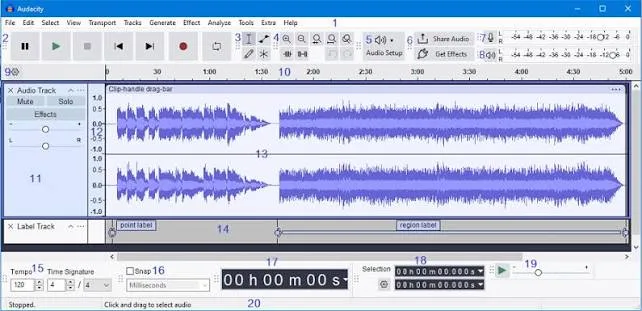
Audacity has been the default answer to "what free podcast software should I start with?" for over a decade. In 2026, that answer still holds — with honest caveats about what it handles well and where it falls short.
According to StudioBinder's podcast recording software roundup, Audacity provides solid recording and multi-track editing capabilities at zero cost: built-in noise reduction, equalization, compression, and MP3 export. For a solo creator recording weekly commentary episodes with a USB microphone, Audacity handles the complete workflow cleanly. Record, trim mistakes, apply noise reduction, export. No subscription, no pricing changes to worry about.
Where Audacity earns its reputation:
The interface is functional, not flashy. It doesn't guide you through a workflow — it presents tools and assumes you know what to do. That's fine after a few hours of learning, but it isn't a gentle on-ramp. A weekend of tutorials pays off quickly for anyone willing to invest the time upfront.
Where Audacity falls short:
- Remote recording — Audacity has no built-in remote guest capability. You'll need a separate tool (Riverside.fm or Cleanfeed are common companions) if your show involves guests who aren't in the same room.
- AI cleanup — No automated filler word removal, no transcript-based editing, no one-click audio polish.
- Video — Audacity is audio-only. A YouTube strategy requires a different tool.
For creators whose needs stay within solo audio production, those gaps are irrelevant. For anyone recording remote guests or producing video output, Audacity becomes one piece of a larger puzzle rather than a complete solution.
Best Professional Audio Suite: Adobe Audition
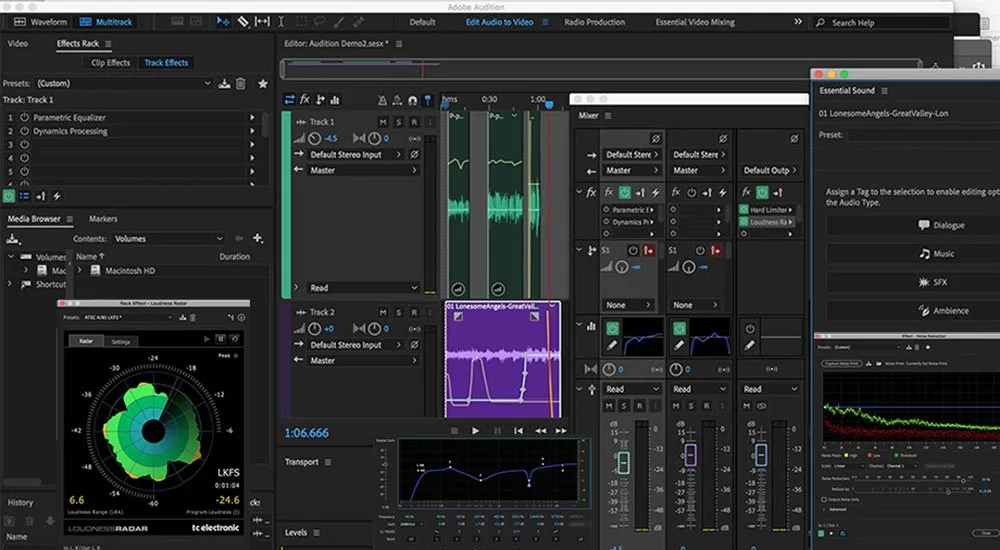
Best for: Experienced audio producers, Creative Cloud users, and anyone doing serious audio restoration work. Skill level: Intermediate to advanced Price: Included with Adobe Creative Cloud subscription
Adobe Audition sits at the serious end of the spectrum. As CyberLink's podcast software guide describes it, Audition covers audio post-production and audio restoration comprehensively — including waveform visualization and sound-removal tools designed for editors who already know what they're doing.
The noise reduction and audio restoration tools in Audition are among the strongest available at this price tier. If your recording environment has HVAC noise, or a remote guest's microphone picked up significant room reverb, Audition gives you surgical control over those problems. That precision is genuinely valuable — but it requires operator knowledge. An inexperienced user applying aggressive noise reduction in Audition can make audio sound worse, not better.
The strongest argument for Audition: ecosystem integration. If you're already a Creative Cloud subscriber using Premiere Pro, After Effects, or Photoshop for show artwork, Audition fits natively. Files move between applications without conversion, and interface conventions carry over.
Worth knowing: Adobe Enhance Speech is a separate AI-powered audio cleanup service within the Adobe ecosystem. According to Podcast Studio Glasgow's 2026 AI tools roundup, it offers a free tier of one hour per day for files up to 30 minutes, with paid access from approximately $9.99/month. It's not a substitute for recording well — but it can rescue usable audio from sessions where conditions were less than ideal.
Best for Video Podcasts: Adobe Premiere Pro vs. CyberLink PowerDirector
Video podcasting has moved from novelty to mainstream distribution strategy. Full episodes on YouTube, short clips on Instagram Reels and TikTok — these channels now drive meaningful audience discovery, and they require tools that treat video as a first-class output rather than an afterthought.
Adobe Premiere Pro
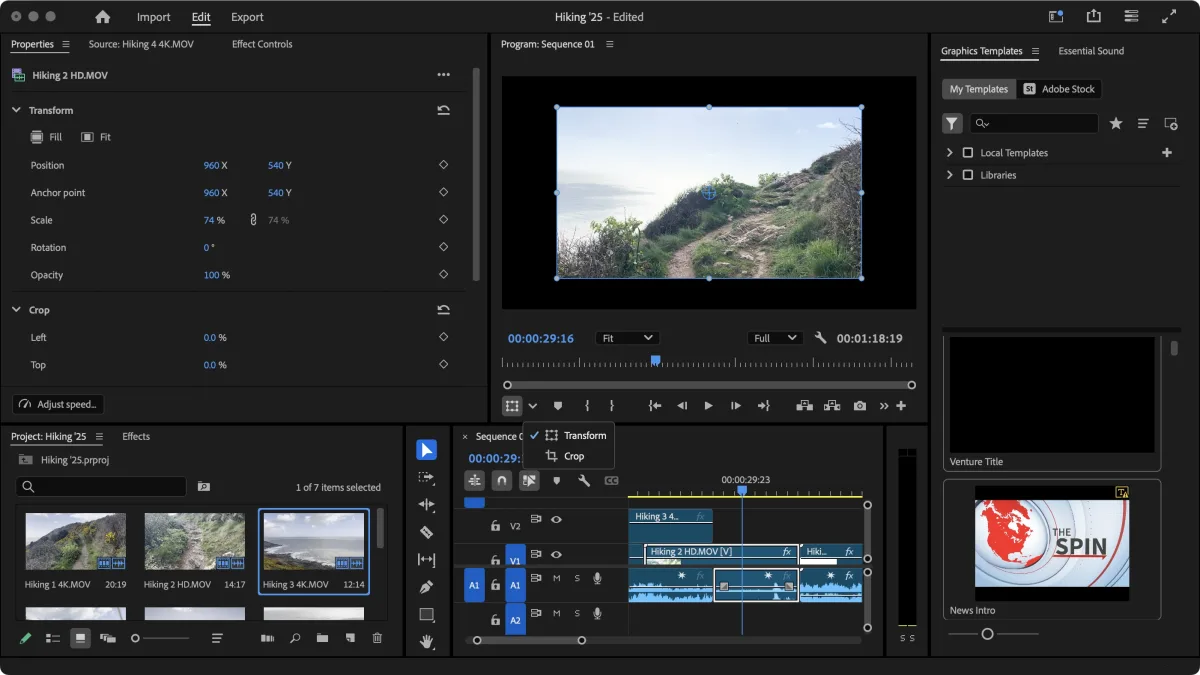
Best for: Teams, experienced video editors moving into podcasting, complex multi-track productions. Skill level: Advanced
Adobe Premiere Pro — described by CyberLink as an Oscar-winning video editor — handles audio and video in a single timeline, with collaboration tools that allow podcast teams to share projects and review edits asynchronously. For shows with a producer, host, and video editor working across time zones, Premiere Pro's shared project features meaningfully reduce the friction of passing large files back and forth.
The ceiling is high. The learning curve is steep. For creators who already know video editing, it's the most capable combined audio-video environment available. For creators who don't, it's a significant investment of time before the first episode ships.
CyberLink PowerDirector
Best for: Individual creators who want professional-looking video podcasts without a six-month learning investment. Skill level: Intermediate
CyberLink PowerDirector, which PCMag named the number one video editing software of 2026 according to CyberLink, takes a more accessible angle. Bundled with AudioDirector, it offers themed overlays, split-screen and picture-in-picture effects, motion titles, and drag-and-drop intro/outro templates. The color correction tools are specifically designed to make webcam footage look broadcast-quality — a meaningful distinction for solo creators who want polished YouTube output without hiring a colorist.
The honest comparison: Premiere Pro is the stronger choice for teams and for creators who already know video editing. PowerDirector is the stronger choice for individual creators who want professional video output without the steep ramp. Both require that you're comfortable managing audio and video tracks simultaneously — combining those workflows is genuinely complex, and jumping into either tool before you've mastered basic audio editing tends to slow you down more than it helps.
Best for Remote Interviews: Riverside.fm
Best for: Any show with remote guests where audio quality matters. Skill level: Beginner to intermediate Price: Free tier (2 hours/month at 720p); paid plans from ~$15/month
Remote recording has a technical problem most creators don't discover until they hear their final file: audio captured over the internet and streamed in real time is compressed, and compression artifacts degrade quality. The audio you monitor during a Zoom call is not the audio you want in your published episode.
Riverside.fm solves this by recording each participant locally on their own device and uploading the high-quality file after the session ends. As SparkPod's podcast app guide explains, each speaker's track is saved separately, giving you maximum flexibility during post-production — you can edit, mix, and process each voice independently, regardless of what the internet connection sounded like during the call.
Beyond recording, Riverside has built a substantial editing and AI toolkit:
- Text-based editing — cut audio by editing a transcript
- Magic Audio — one-click sound polishing across tracks
- Magic Clips — automatically identifies the most engaging moments and generates shareable short-form videos for social media
- Built-in teleprompter for scripted segments
- Integrated hosting and distribution — for some creators, it functions as a near-complete production environment from recording through publishing
According to Podcast Studio Glasgow, the free tier covers 2 hours of recording per month at 720p resolution, with paid plans starting around $15/month.
If you're evaluating CRM or project management tools alongside your podcast stack — common for creators who run their show like a small business — the Best CRM Software for Small Business 2026 offers comparable structured comparisons by use case and team size.
Best for Beginners: Descript
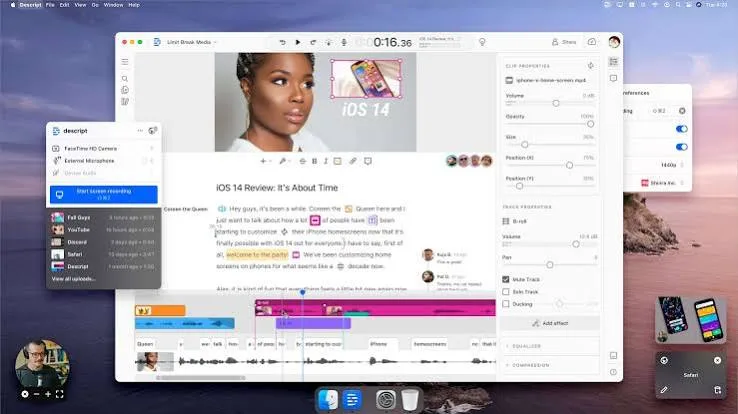
Best for: First-time podcasters, interview shows, creators who want to edit without learning audio engineering. Skill level: True beginner Price: Free tier (1 hour transcription/month); paid from ~$12/month
Descript operates on a premise that's fundamentally different from every other tool on this list. Instead of presenting a waveform and asking you to spot mistakes visually, Descript transcribes your recording and lets you edit the text. Delete a sentence from the transcript, and the corresponding audio disappears. It genuinely feels like editing a Google Doc, not operating audio software.
As Podcast Studio Glasgow puts it, for beginners who have never opened an audio editor, Descript removes the learning curve entirely — the interface matches what they already know. That comparison is accurate and matters enormously for creators whose primary skill is communication, not technical production.
The filler word removal feature deserves specific mention. Descript automatically detects and removes instances of "um," "uh," and "you know" across an entire recording in seconds. For interview podcasters who spend significant time manually hunting through waveforms to clean up conversational speech, this single feature can cut editing time substantially.
The honest limitation: Descript offers less precise audio control than a traditional DAW. For a music-heavy show with complex sound design, that imprecision will frustrate you. For a conversational interview podcast where spoken content is the entire product, it's rarely a problem.
AI Tools Changing the Podcast Workflow in 2026
AI tools in podcast production are genuinely useful — for specific, well-defined tasks. They're not replacing creative judgment. They're eliminating the most repetitive, time-consuming parts of a workflow that used to require manual attention.
Recast Studio focuses on post-production and content repurposing. According to Recast Studio's own documentation, the platform generates transcripts, creates branded audiograms and video clips, produces AI-generated short clips, writes podcast summaries, and generates automatic subtitles. It's user-friendly with fast processing and broad audio format support. The main limitation: limited third-party plugin support, which matters less for creators who want an all-in-one repurposing tool and more for those who need deep customization.
Automated transcription has moved from nice-to-have to workflow essential. Sonix reports 99% accuracy rates for clear audio and up to 70% cost savings compared to manual transcription. For podcasters who publish show notes, blog posts, or accessibility transcripts alongside episodes, this is a practical time saver worth prioritizing.
Opus Clip and Riverside's Magic Clips both automate short-form video creation from long episodes. Opus Clip starts at approximately $24/month as a standalone tool; Magic Clips is included within Riverside's platform tiers.
ChatGPT and similar AI writing tools have entered the pre-production workflow. According to Podcast Studio Glasgow, these tools are most useful for overcoming blank-page paralysis: planning episode outlines, drafting show notes, generating interview question frameworks, and researching topics quickly. The free tier offers substantial utility; paid tiers from approximately $20/month unlock more capable models. For a deeper look at how AI writing tools compare for content-heavy workflows, the Best AI Writing Tools in 2026 comparison covers the major options side by side.
Podcast Tool Comparison: Quick Reference
| Tool | Best For | Free Tier | Paid From | Skill Level |
|---|---|---|---|---|
| Audacity | Solo audio recording & editing | Fully free | Free | Beginner–Intermediate |
| Adobe Audition | Professional audio post-production | No | Creative Cloud subscription | Intermediate–Advanced |
| Adobe Premiere Pro | Video podcasts, team collaboration | No | Creative Cloud subscription | Advanced |
| CyberLink PowerDirector | Video podcasts with drag-and-drop templates | Limited | Subscription or one-time purchase | Intermediate |
| Riverside.fm | Remote interviews, live streaming, AI clip generation | 2 hrs/month (720p) | ~$15/month | Beginner–Intermediate |
| Descript | Text-based editing, filler word removal | 1 hr transcription/month | ~$12/month | Beginner |
| Recast Studio | AI repurposing, audiograms, subtitles | Limited | Varies | Beginner–Intermediate |
| Adobe Enhance Speech | AI noise removal and audio cleanup | 1 hr/day (30-min files) | ~$9.99/month | All levels |
Which Podcast Tool Should You Start With? A Decision Framework
If you've never edited audio and want to start publishing quickly: Start with Descript. The text-based interface removes the technical barrier, and filler word removal alone will make your first episodes sound noticeably cleaner. Upgrade to a DAW once you understand what you want to control more precisely.
If you record solo episodes with no guests: Audacity. It handles everything a solo podcaster needs at zero cost, and the skills you build transfer to more advanced DAWs later.
If your show involves remote guests and audio quality matters: Riverside.fm. The local recording architecture solves the quality problem that Zoom-recorded interviews create, and the AI features reduce post-production time meaningfully.
If you're an experienced audio or video professional: Adobe Audition for audio-only shows, Adobe Premiere Pro for video podcasts. The ceiling is high and the Creative Cloud ecosystem integration is a real workflow advantage if you're already in it.
If video output is central to your distribution strategy: CyberLink PowerDirector for individual creators who want polished video results without a steep learning investment. Premiere Pro for teams or anyone already familiar with the Adobe environment.
One principle worth holding regardless of which tool you choose: the best podcast recording and editing tool in 2026 is the one you consistently open. Consistency compounds. A good-enough tool used every week beats a powerful tool opened twice.
For creators managing their podcast production alongside other business software — accounting, project management, email marketing — the Best Business Software Deals in 2026 rounds up current offers across CRM, accounting, and productivity tools worth stacking with your podcast workflow.
Frequently Asked Questions
What's the best free podcast recording software in 2026? Audacity remains the strongest free option for solo audio recording and editing. It handles multi-track editing, noise reduction, equalization, and MP3 export at no cost. For remote guests on a free budget, Riverside.fm's free tier covers 2 hours of recording per month.
Do I need a DAW or an all-in-one platform? That depends on your goals. A DAW gives you more precise control but requires more learning. An all-in-one platform like Riverside.fm or Descript gets you to a publishable episode faster. Beginners are almost always better served starting with an all-in-one and graduating to a DAW once they know what they want to control.
Can AI tools fully replace audio editing? Not yet — and not for complex productions. AI tools like Descript's filler word removal, Riverside's Magic Audio, and Adobe Enhance Speech automate the most repetitive tasks well. But creative decisions about pacing, structure, music, and storytelling still require human judgment.
Is Descript good enough for professional podcasts? Descript is well-suited for conversational interview shows and solo commentary formats. For shows with complex sound design, music beds, or precise multi-track mixing requirements, a traditional DAW like Adobe Audition will serve you better.
Which tool is best for video podcasting specifically? Adobe Premiere Pro for teams and experienced video editors; CyberLink PowerDirector for individual creators who want professional results without the learning investment. Both assume you're already comfortable with basic audio concepts before adding video to the mix.
How this guide was researched: This guide is based on manufacturer specifications, expert sources, and verified user feedback aggregated from third-party review sites including StudioBinder, Alitu, Podcast Studio Glasgow, Sonix, SparkPod, and CyberLink. It does not reflect hands-on testing by Trusted Buyer Report. This article was drafted with AI assistance and reviewed by our editorial team before publishing.