How this guide was researched: This guide synthesizes expert testing data from RTINGS.com, Tom's Hardware, Tom's Guide, and CNN Underscored, plus market data from Coherent Market Insights' 2026 mechanical keyboard report. Trusted Buyer Report has not independently tested the keyboards listed. Sources are cited throughout.
TL;DR — Which Mechanical Keyboard Should You Buy?
- Best all-around for typing + light use: Keychron Q1 Pro (~$150–$200) — gasket mount, aluminum case, tri-mode wireless, hot-swappable. Best single purchase for most people.
- Best for serious typists and writers: Keychron Q5 Max — RTINGS.com's top pick for typing and programming.
- Best budget entry: Keychron V5 Max (~$100) — RTINGS.com's top budget mechanical pick, features usually found on pricier boards.
- Best ergonomic pick: Asus ROG Falcata — gaming-grade features in a split ergonomic form factor.
- Best for writers who also do light competitive play: Keychron Q1 HE — Hall Effect switches with adjustable actuation, tri-mode wireless, 1000Hz polling.
This guide is for: Writers, programmers, remote workers, students, and hybrid users who spend more time typing than gaming. If competitive gaming performance (polling rate, rapid trigger, gaming mice) is your primary need, the Best Gaming Keyboards & Mice 2026 guide covers that territory in depth.
Why the Mechanical Keyboard Market Isn't Built for Typists
Here's a fact that explains most of the buying confusion: according to Coherent Market Insights' 2026 mechanical keyboard report, non-tactile linear switches hold an estimated 60.5% of the mechanical keyboard market, driven primarily by gaming demand. That means the majority of keyboards you encounter on any retailer's page are optimized for gaming — even when they're marketed as "general purpose."
If you're a writer, programmer, or remote worker who games occasionally, you're buying in a market that wasn't primarily designed for you. Most product listings lean on polling rates and RGB specs that mean nothing for typing quality, while burying the specs that actually matter: switch type, mounting style, keycap material, and acoustic profile.
This guide reverses that priority. It focuses on what makes a mechanical keyboard excellent for typing and general use, then identifies which picks also hold up for occasional to moderate gaming — without treating gaming performance as the primary criterion.
The 5 Specs That Actually Determine Typing Quality
Before any product recommendation, five variables determine how a mechanical keyboard feels and sounds over thousands of hours of daily use.
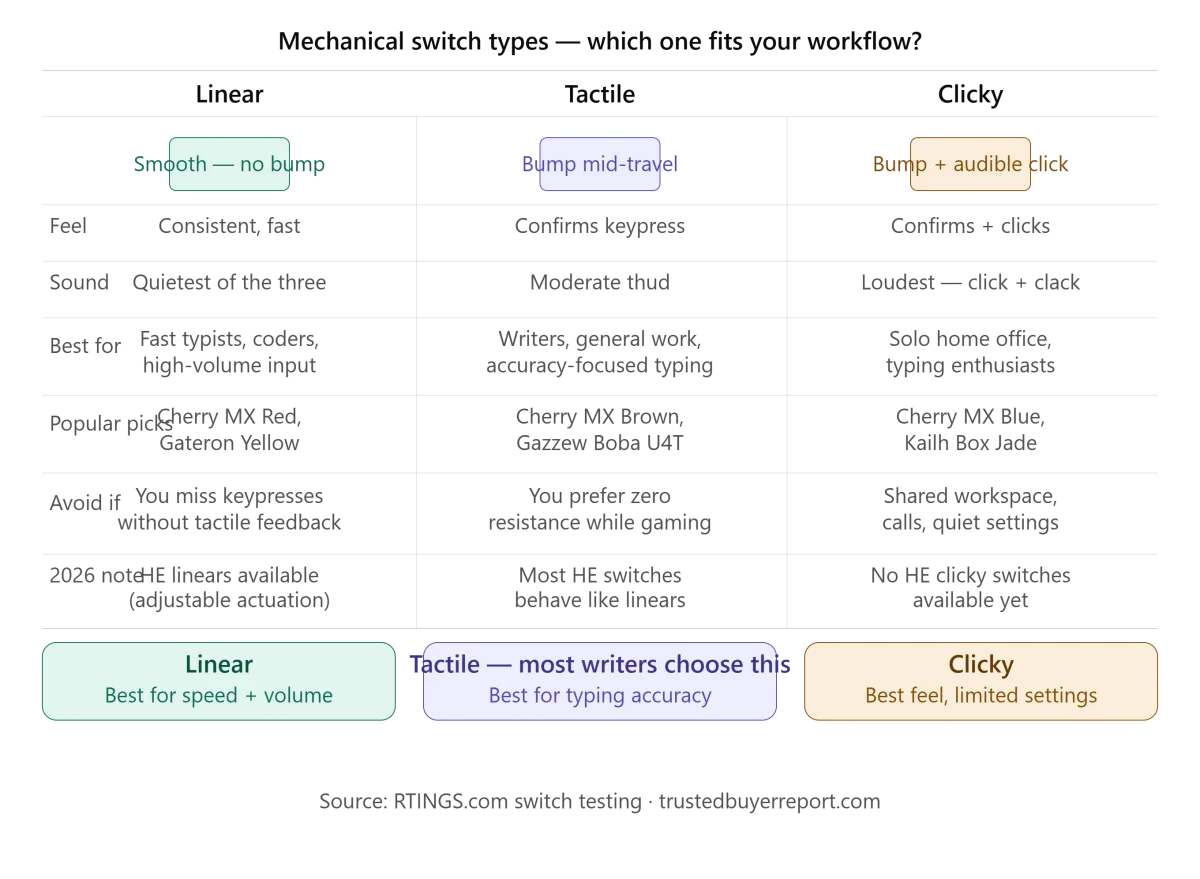
1. Switch type. The single biggest variable. Linear switches move straight down with no tactile bump — fast, smooth, quietest of the three types. Preferred by gamers, but also by programmers who type at speed and want consistent, fatigue-free keypresses. Tactile switches provide a physical bump mid-travel that confirms a keypress without you bottoming out the key — the dominant choice for writers because the bump reinforces accuracy. Clicky switches add an audible click to that bump. Excellent typing feel in a home office; genuinely inconsiderate in shared spaces.
2. Mounting style. Gasket mounting suspends the PCB between layers of soft material — the keystroke is cushioned, like pressing into foam rather than concrete. Tray-mount and top-mount designs are stiffer, transmitting more vibration to your hands over long sessions. As UniKeys' 2026 buyer's guide notes, gasket mounting is the single biggest contributor to long-term typing comfort.
3. Keycap material. PBT plastic is denser and more oil-resistant than ABS. After six months of daily use, ABS keycaps develop a shiny, greasy surface from fingertip contact. PBT resists this. For any keyboard you plan to use daily for a year or more, PBT keycaps are a meaningful upgrade — or a reason to avoid a board that ships with ABS.
4. Hot-swappable PCB. A hot-swap socket lets you pull switches out and replace them without soldering. This matters for two reasons: you can retune the feel as your preferences evolve, and the keyboard has a longer useful life if a switch fails. For most buyers not already committed to a specific switch, hot-swap is worth prioritizing.
5. Acoustic profile. How a keyboard sounds matters — to you over eight hours, and to anyone else in earshot. Gasket mounting, foam dampening layers, and PBT keycaps all reduce the harsh "clack" of cheaper boards. The KBParadise V80, for example, produces noticeable PCB resonance ping that Wirecutter flags as an out-of-box frustration on budget boards. Before buying anything under $80, check reviews specifically for acoustic complaints.
Form Factor: Which Size Fits Your Desk and Workflow?
Form factor is a practical decision before it's an aesthetic one.
Full-size (100%) includes a numpad — genuinely useful for accountants, data analysts, spreadsheet-heavy work, and anyone who enters numbers frequently. Trade-off: it pushes your mouse further right, which can cause shoulder strain over long sessions. Tom's Hardware's senior editor Sarah Jacobsson Purewal notes that full-size boards get overlooked in coverage dominated by gaming-oriented compact layouts — if you use a numpad regularly, this format is worth the desk space.
TKL (tenkeyless) removes the numpad, recovering roughly 20% of horizontal space without eliminating the function row or navigation cluster. For most writers who don't use a numpad, this is the minimum useful layout — F1–F12 for software shortcuts and dedicated arrow keys for text editing are both preserved.
75% has become the most popular choice for dual-use (typing + occasional gaming), per UniKeys' 2026 guide, because it retains a function row and arrow keys in a compact footprint. Nothing essential is missing; the reduced size means less arm travel and more room for a notebook or secondary screen.
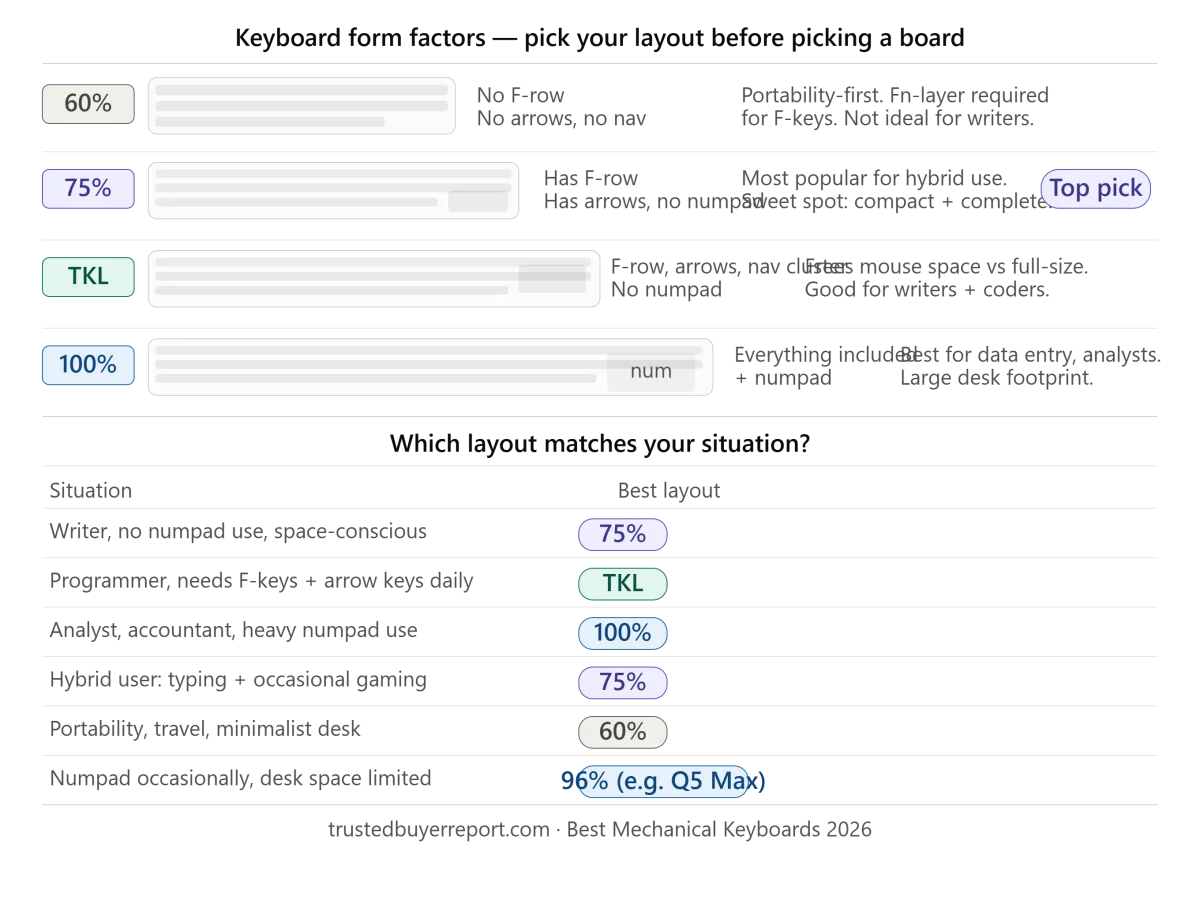
65% and 60% go further in compactness but require key combinations (Fn + key) to access function keys and sometimes navigation. For a writer who relies on F5 to refresh previews, or anyone who edits text frequently with arrow keys, this friction adds up. These layouts make more sense for portability or enthusiasts who've committed to learning the layer system.
Best All-Around Mechanical Keyboard for Typing and General Use: Keychron Q1 Pro
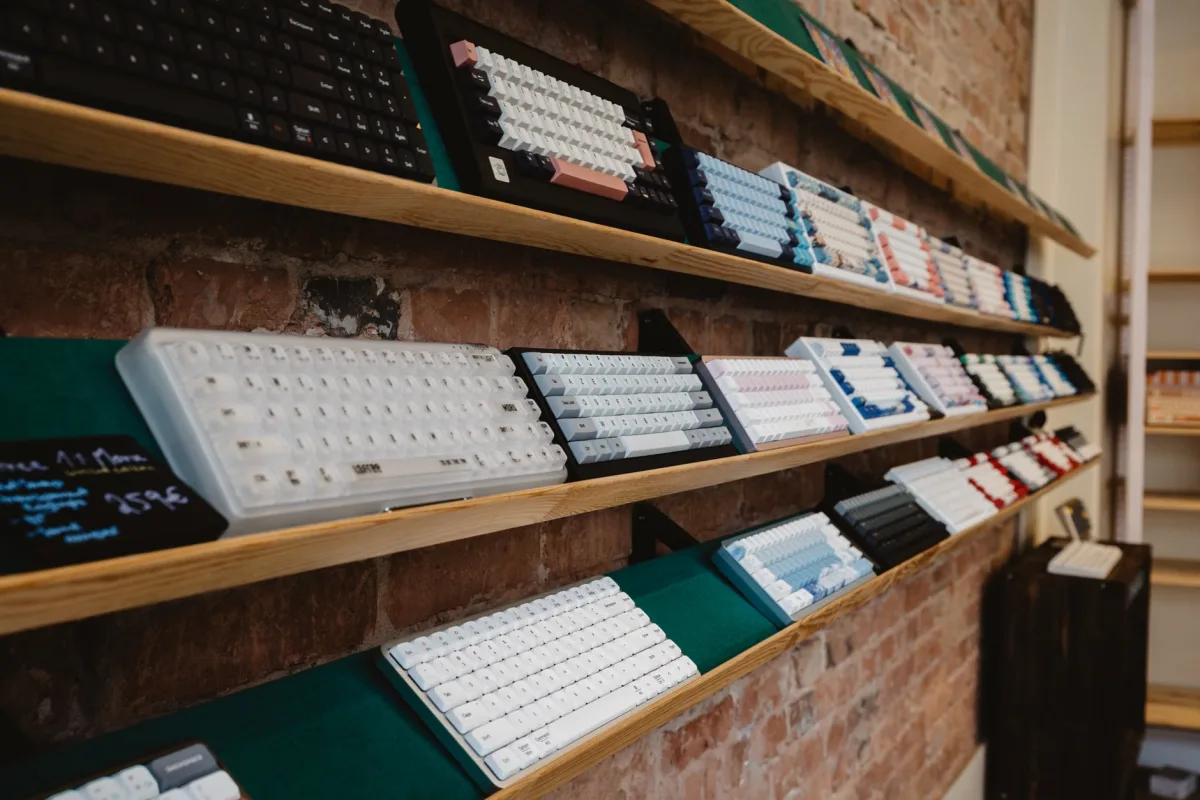
The Keychron Q1 Pro earns its consensus all-around position in 2026 for specific, concrete reasons — not marketing momentum.
CNN Underscored's mechanical keyboard guide, written by a former Wirecutter executive editor who spent months testing dozens of boards, calls the Q1 Pro's predecessor "quiet, stable, and simple to customize" — and notes the Q1 Pro improves on that with Bluetooth connectivity. Their verdict: "Keychron's Q-series keyboards are so comfortable and quiet to type on, so easy to configure to taste, and so solidly built that unless you're an enthusiast after something specific from a custom build, I really don't see any reason to spend more."
What earns that verdict:
Gasket-mount construction delivers a cushioned, comfortable keystroke that reduces hand fatigue during long writing sessions — the same property that takes the edge off the harsh, clacky sound profile that plagues cheaper boards.
Aluminum case adds rigidity and a premium feel without making the keyboard unreasonably heavy or resonant.
Hot-swappable PCB means you can try tactile switches for writing and swap to linears later — or replace a failing switch — without buying a new board or learning to solder.
Tri-mode wireless (Bluetooth, 2.4GHz, USB-C) gives flexibility across desktop and laptop setups. The 2.4GHz connection keeps latency low enough for gaming; Bluetooth lets you pair to a tablet or secondary device.
75% layout hits the sweet spot for dual use: compact enough for comfortable mouse positioning, complete enough for uninterrupted typing workflows.
Wirecutter recommends the broader Keychron Q Max series (including the Q1 Max, Q2 Max, and Q5 Max) for best typing experience and features at reasonable prices — the Q1 Pro sits in the same lineage at a slightly lower price point.
Honest caveat: The Q1 Pro is not optimized for competitive gaming. If you play ranked matches where sub-millisecond latency matters or want adjustable actuation points, there are better-engineered options — including the Q1 HE variant discussed below, or the boards covered in the Best Gaming Keyboards & Mice 2026 guide.
Best for Serious Typists and Writers: Keychron Q5 Max
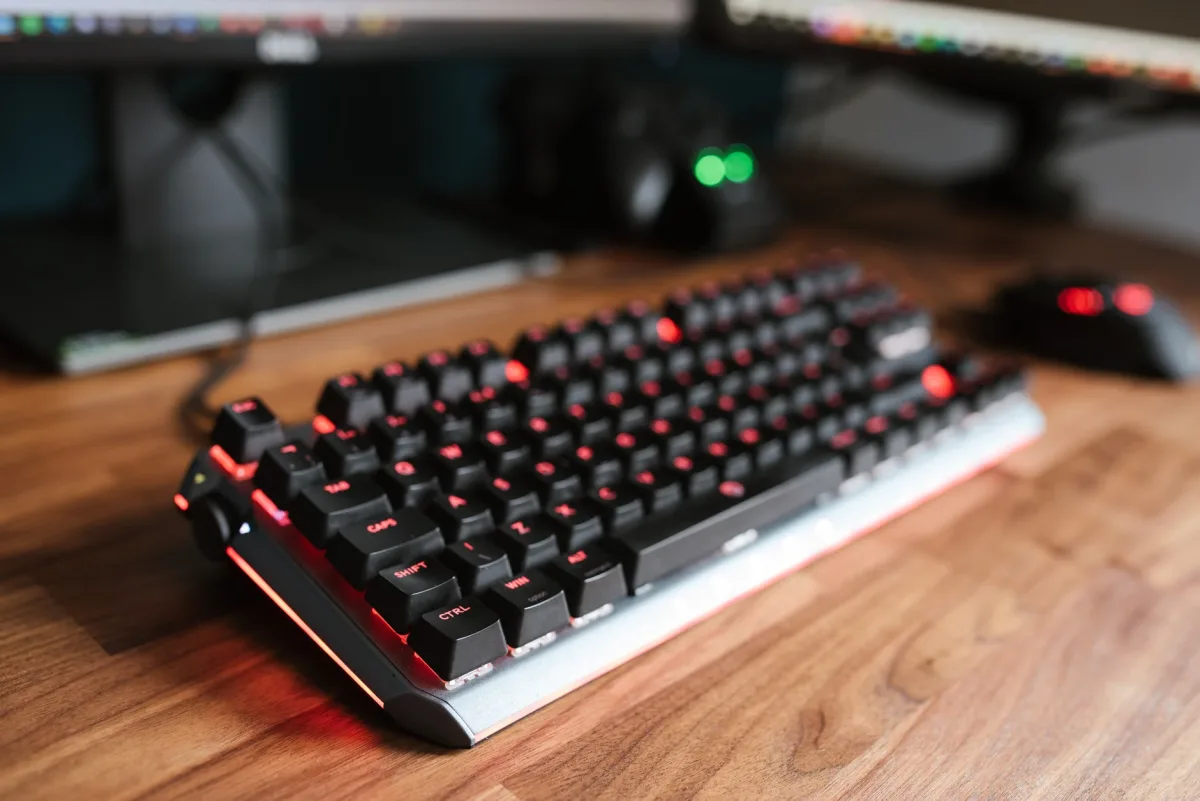
For buyers whose primary use is extended writing, programming, or data work — with gaming as a secondary or occasional activity — the Keychron Q5 Max is the clearer recommendation.
RTINGS.com names it the best keyboard for typing, the best mechanical keyboard overall, and the best keyboard for programming in their 2026 testing. That consistency across use cases reflects its premium-feeling construction, heavyweight aluminum case, and typing quality that's genuinely better out of the box than most competitors at similar prices.
The 96% layout is the key differentiator from the Q1 Pro: it preserves a numpad while keeping overall dimensions tighter than a full-size board — a useful compromise if you enter numbers regularly but don't want to sacrifice desk space entirely. The double-gasket design and flexible PC plate give it a notably bouncy, satisfying keystroke quality that typists who have tried both layouts consistently prefer.
Tom's Guide also lists the Lemokey P1 HE as "stupidly good for typing" among magnetic switch alternatives — worth considering if you want Hall Effect performance with excellent typing feel.
Best Budget Mechanical Keyboard in 2026: Keychron V5 Max (~$100)
The entry-level mechanical keyboard segment has improved substantially. The gap between a $100 board and a $200 board is narrower in 2026 than it was three years ago — but it hasn't disappeared, and knowing where budget keyboards cut corners helps you avoid the ones that cut them in the wrong places.
RTINGS.com's top budget mechanical pick is the Keychron V5 Max, which they describe as offering features usually found on more expensive custom-style keyboards. For a first mechanical keyboard, it delivers the core experience — mechanical switches, solid build, decent acoustics — at a price that doesn't require significant financial commitment.
Tom's Hardware recommends the Keychron C2 Pro as the best productivity budget pick starting under $55 — full-size layout, double-shot PBT keycaps, removable braided cable — noting it doesn't sound or feel as solid as pricier alternatives but doesn't feel hollow or cheap either.
Where budget keyboards consistently cut corners: keycap material (ABS instead of PBT), mounting style (tray-mount instead of gasket), and case material (plastic instead of aluminum). These trade-offs are real but manageable. ABS keycaps can be replaced; foam dampening can reduce tray-mount harshness. What's harder to fix is a nonremovable cable — a drawback on several otherwise decent budget boards.
Acoustic note: Before buying anything under $80, check reviews specifically for PCB resonance or stabilizer noise. These are the most common out-of-box frustrations on entry-level boards, and they're difficult to fix without modifications.
Hall Effect Switches: The Biggest Development in Mechanical Keyboards for 2026
Hall Effect (HE) switches are the most significant technology shift in mechanical keyboards right now — and they matter for typing users as well as gamers.
Unlike traditional mechanical switches that use physical contact points to register keypresses, HE switches use magnetic actuation — a magnet passes through a sensor without any physical contact. This eliminates contact-point wear over time and, more importantly, enables adjustable actuation: you can tune when the keyboard registers a keypress anywhere from 0.1mm to 3.8mm of travel.
For typists, adjustable actuation means you can set a longer travel distance (say, 2.5–3mm) that more closely mimics the feel of a classic tactile switch, reducing accidental keypresses during fast typing. For occasional gaming, you can drop it to 0.5mm for faster registration without swapping physical switches.
Tom's Hardware reviewed the Keychron Q1 HE, noting its gasket-mounted aluminum chassis delivers "a comfortable, nice-sounding typing experience" thanks to sound-dampening foam, while magnetic switches allow actuation sensitivity down to 0.1mm. The tri-mode wireless (2.4GHz/Bluetooth/USB-C) and 1000Hz polling rate make it a genuine crossover option.
Tom's Guide lists the Lemokey P1 HE as "stupidly good for typing" — a magnetic switch keyboard that prioritizes typing feel over gaming-first engineering. For buyers who want HE flexibility without spending premium pricing, this is a strong alternative to the Keychron HE line.
Important HE caveat: Hot-swap on HE boards only works with compatible magnetic switches — you can't swap in a standard Cherry MX or Gateron mechanical switch. If broad switch compatibility matters to you, a standard hot-swap mechanical board (Q1 Pro, Q5 Max) remains the more flexible long-term choice.
Best Ergonomic Mechanical Keyboard for Long Sessions: Asus ROG Falcata
Hand fatigue is underreported as a buying criterion because it's invisible until it becomes a problem. Writers, programmers, and power users who spend four or more hours daily at a keyboard are the most likely to experience ulnar deviation — the inward wrist angle that standard keyboard layouts force — and wrist extension from typing on a flat surface.
PCMag's April 2026 editorial update added the Asus ROG Falcata as the best ergonomic keyboard, replacing the Kinesis Freestyle Edge RGB. The update reflects a meaningful category shift: the Falcata brings gaming-oriented features into an ergonomic form factor, rather than asking users to sacrifice build quality for comfort. For anyone who games occasionally and types extensively, this is the option that protects both.
If you've noticed wrist or forearm discomfort after sessions exceeding two hours, the ergonomic category deserves serious evaluation before your next standard-layout purchase. The ROG Falcata is the current best option for users who don't want to choose between performance and physical comfort.
PBT vs. ABS Keycaps: Why This Matters More Than Most Guides Admit
Most buyers focus on switches and miss the keycap material decision entirely. After six to twelve months of daily use, the difference becomes visible and tactile.
ABS (acrylonitrile butadiene styrene) is the cheaper plastic. It develops a shiny, slick surface from fingertip oils over time — what the keyboard community calls "shine." Beyond aesthetics, the shine changes the texture of keycap contact, which some typists find affects accuracy. Wirecutter specifically flags ABS keycaps on budget boards as feeling cheaper and wearing out sooner.
PBT (polybutylene terephthalate) is denser and more oil-resistant. Keycaps maintain their texture and matte finish significantly longer. For any keyboard you plan to use as a daily driver for a year or more, PBT keycaps are a meaningful quality signal — or a reason to skip boards that ship with ABS.
A practical note: aftermarket PBT keycap sets are widely available for $30–$80 and fit any board with standard keycap sizing. If you love a board's switches and mounting but dislike its included ABS keycaps, replacing them is a straightforward upgrade.
The 2026 8K Polling Rate Development: What It Means for Typists
A significant 2026 development that most typing-focused guides miss: Keychron's Ultra 8K series introduced keyboards with 8,000Hz polling rates and, critically, battery lives of 550–660 hours at that polling rate — enabled by ZMK firmware rather than the more power-hungry QMK.
Tom's Hardware reviewed the Keychron V5 Ultra 8K ($120), awarding it 4.5 stars and their EC award. For buyers who want an 8K polling rate — relevant if you also play competitive titles where sub-millisecond responsiveness matters — the V5 Ultra 8K is the most accessible entry point that doesn't compromise battery life to achieve it.
For pure typing users, 8K polling is irrelevant — 1000Hz is more than sufficient for any typing workflow. But if you want a single keyboard that handles long writing sessions and competitive gaming sessions without switching, the Ultra 8K line removes the previous trade-off between polling rate and battery.
Quick Reference: Match Your Use Case to the Right Board
| Who you are | Right board | Why |
|---|---|---|
| Writer, programmer, remote worker — typing all day | Keychron Q5 Max | RTINGS.com's top pick for typing and programming; premium gasket-mount feel |
| Hybrid user — typing most of the day, gaming evenings | Keychron Q1 Pro | Best balance of typing comfort and wireless gaming flexibility |
| Hybrid user who wants HE adjustable actuation | Keychron Q1 HE | Hall Effect switches, 0.1–3.8mm adjustable, tri-mode wireless |
| Budget-conscious first mechanical keyboard | Keychron V5 Max or C2 Pro | Premium features at entry price; hot-swappable on V5 Max |
| Wrist/forearm fatigue, ergonomic priority | Asus ROG Falcata | PCMag's top ergonomic pick; gaming-grade in ergonomic form factor |
| Full-size / numpad required | Keychron Q5 Max (96%) | Preserves numpad in more compact footprint than 100% boards |
Frequently Asked Questions
What switch type is best for typing?
Tactile switches — Cherry MX Brown, Gateron Brown Pro, Gazzew Boba U4T — are the most common recommendation for writers because the mid-travel bump confirms each keypress without requiring you to bottom out. RTINGS.com's best keyboard switch testing recommends the Gazzew Boba U4T for most people: it has a short pre-travel and a strong, rounded tactile bump that's more pronounced than the Cherry MX Brown, which many typists find too subtle. Linear switches work well for fast, high-volume typists who don't want bump feedback. Clicky switches provide the clearest tactile and auditory confirmation but are impractical in shared spaces.
Is a hot-swappable keyboard worth it?
For most buyers, yes. Hot-swap sockets let you replace switches without soldering — which means you can experiment with different switch types after purchase, and you can replace a failing switch rather than buying a new keyboard. The cost premium over soldered boards is typically small ($10–$30 at the same quality tier). The Keychron Q1 Pro, Q5 Max, and V5 Max are all hot-swappable.
What's the difference between a mechanical keyboard for typing vs. one for gaming?
The primary difference is priority, not exclusion. Typing-optimized boards prioritize switch feel, acoustic profile, mounting comfort, and keycap quality — features that matter across hours of daily use. Gaming-optimized boards prioritize polling rate, actuation speed, and connection stability. A board like the Keychron Q1 Pro handles both adequately. A board like the Wooting 80HE is engineered specifically for gaming input performance and is excellent for that, but its typing experience is secondary. For dedicated gaming peripherals — including wired vs. wireless keyboards and gaming mice — see the Best Gaming Keyboards & Mice 2026 guide.
Does keyboard polling rate matter for typing?
No. Polling rate — how frequently the keyboard reports its state to the computer — is a gaming-relevant spec. At 1000Hz, the keyboard reports 1,000 times per second, which is far faster than any human typing speed. For typing, the meaningful specs are switch feel, mounting style, and acoustic profile. The 8K polling rate boards from Keychron are interesting because they also happen to offer exceptional battery life via ZMK firmware — not because the polling rate improves typing in any measurable way.
What is gasket mounting and why does it matter?
Gasket mounting suspends the keyboard's PCB between layers of soft material (foam, silicone, or rubber gaskets), rather than screwing it rigidly to the case. The result is a softer, more cushioned keystroke — the force of each keypress is partially absorbed before reaching your fingers. This reduces hand fatigue during extended typing sessions and gives the keyboard a more premium sound profile. Most keyboards under $80 use tray-mount designs; gasket mounting typically appears in the $100+ range. It's the single most impactful spec for typing comfort.
Should I get a 75%, TKL, or full-size layout?
For most writers and hybrid users: 75% — it retains a function row and arrow keys in a compact footprint. If you enter numbers frequently, consider the 96% (Keychron Q5 Max) which adds a numpad without the full footprint of a 100% board. Avoid 60% unless you're committed to learning the Fn-layer system for function keys — the friction adds up during text editing. See the form factor section above for the full breakdown.
This article was researched and drafted with AI assistance, then reviewed and fact-checked by our editorial team before publishing. Sources are cited throughout. Trusted Buyer Report may earn a commission from purchases made through links on this page — this does not affect our rankings or recommendations, which are finalized before any affiliate link is applied. Full methodology · Affiliate disclosure · AI ethics policy