

We may earn a commission when you use our links to make a purchase. This guide was researched and drafted with AI assistance, then reviewed by our editorial team. Our rankings are finalized before any affiliate link is applied. Read our full disclosure →
Bottom line up front: The best CRM for your small business is the one your team will actually open every morning — not the one with the longest feature list. For most small teams in 2026, that means HubSpot Free (zero budget), Zoho Bigin (solopreneur/1–3 people), Pipedrive (5-person sales team with an active pipeline), Freshsales (inbound lead volume that needs prioritization), or Salesforce Starter (growing past 10 people and never wanting to migrate again). Keep reading to find out which one fits your actual situation.
Here is the counterintuitive fact that most CRM roundups ignore: small businesses don't fail at CRM because they chose a bad product. They fail because they chose the wrong product for their specific situation. According to Wave Connect's 2026 CRM implementation research, over half of CRM deployments fail to meet their stated goals — and the leading culprit is not software quality, but mismatched expectations, team size, and workflow complexity.
That makes the question most CRM guides try to answer — "which CRM is best?" — the wrong place to start. The more useful question is: which CRM fits how your team actually works, what your budget genuinely allows, and where your business needs to be in 18 months?
This guide is structured around that question. Before any product is named in depth, you'll build a clear picture of your own business profile. Every comparison you read after that is already filtered for your situation — not for a generic "small business" that may look nothing like yours.
Why Picking the Wrong CRM Costs More Than You Think
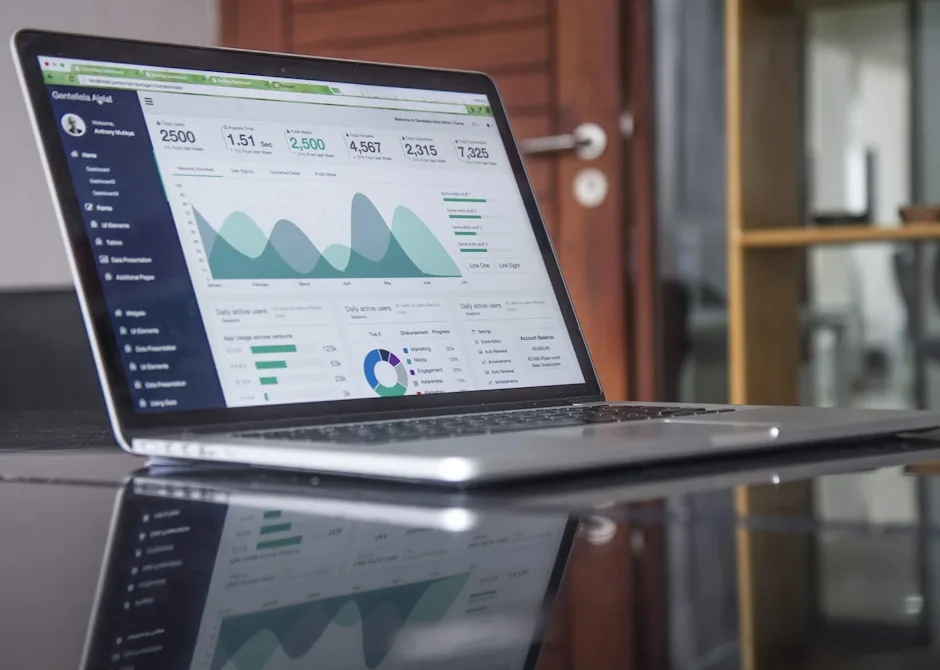
The visible cost of a bad CRM decision is the subscription fee you stop paying when you cancel. The invisible cost is everything else: the hours spent migrating contacts, the onboarding sessions your team sat through, the weeks of disrupted workflow, and the eventual retreat to spreadsheets that were "good enough" before you started. For a five-person team, that hidden cost can easily exceed the annual software spend — several times over.
Two failure patterns show up most often. The first is the team that adopts an enterprise-grade platform with territory management, advanced forecasting, and multi-currency support — then spends more time on data entry than selling because the system demands more than the team has or needs. The second is the solo consultant who pays for a mid-tier automation plan but uses exactly two features: a contact list and a notes field.
Both waste money. Both are entirely avoidable with a clearer buying framework upfront.
A CRM that is too complex creates active resistance — people find workarounds, skip logging calls, and the data quality degrades until the tool is useless. A CRM that is too simple creates passive workarounds — sticky notes, parallel spreadsheets, and email threads that live outside the system. Understanding these failure modes before you evaluate any product reframes the entire decision from "which has the most features" to "which will my team actually open every morning."
If you're evaluating several business tools at once — CRM, security, productivity software — the Software & Apps Buyer's Guide 2026 provides a useful framework for thinking through your full stack, including tools that often integrate directly with CRM platforms.
What Small Businesses Actually Need from a CRM in 2026
Strip away the marketing language and most small businesses need four things from a CRM: a centralized place to store contact information, a way to track where each deal or relationship stands, integration with their existing email, and basic reporting on pipeline health. Everything beyond that is either a nice-to-have or a distraction, depending on your stage.
At the growth stage — roughly when you have more leads than one person can mentally track — secondary features start earning their keep. Task automation prevents follow-ups from falling through the cracks. Lead scoring helps prioritize which prospects deserve the most attention. Integrations with tools you already use (accounting software, project management platforms, communication tools) prevent customer data from living in silos.
As Nimble's 2026 CRM analysis notes, cloud-based CRM is now the default choice for small businesses because it removes on-premise maintenance and allows access from any device. For a team where the owner is on-site with a client and the sales rep is working remotely, this isn't a luxury feature — it's a baseline requirement.
One point that's frequently overlooked: a CRM's contact management role extends beyond sales leads. As TechRadar's small business CRM guide points out, small businesses often need to manage contacts for customers, suppliers, contractors, and staff in one place. A platform that treats everything as a "lead" creates friction for businesses with more complex relationship types.
Features commonly oversold to small businesses include: advanced AI forecasting, territory management, and multi-currency support. These capabilities are genuinely valuable at scale. At five or ten people, they add complexity without adding proportional value. Knowing this before you read a feature comparison prevents you from paying for capabilities you won't use for years.
How to Identify Your Business Profile Before Comparing Any CRM

Answer these five questions before you read a single product description. Your answers will filter every comparison in this article.
1. Team size. Are you a solo operator, a team of two to five, or approaching ten or more? Team size directly determines what you'll pay per month and how much onboarding complexity is acceptable.
2. Technical comfort level. Can your team configure new software independently, or do you need something that works out of the box? This determines how much setup friction you can absorb.
3. Sales process complexity. Is your typical sale a single conversation, or does it involve multiple stages, stakeholders, proposals, and follow-up sequences? A simple process needs a basic pipeline. A complex B2B sale needs custom stages, reminders, and document tracking.
4. Budget ceiling per user per month. Establish this number before evaluating features. It's much easier to rationalize spending more once you've fallen in love with a product's feature list.
5. Growth trajectory. Are you stable at your current size, or do you expect to double headcount within 12–18 months? As Sybill's 2026 CRM rankings point out, businesses planning to scale fast should weight long-term platform fit heavily — switching CRMs mid-growth is expensive and disruptive.
Three profiles emerge from these questions:
- Profile A — Solo/very small team, simple process, low technical comfort. Best served by a free or very low-cost tool focused on contact tracking and basic pipeline visibility.
- Profile B — Five-person sales team, moderate technical comfort, active pipeline. Needs a visual pipeline, solid email integration, and task automation without excessive configuration overhead.
- Profile C — Approaching 10+ people, higher technical comfort, complex multi-stage sales cycle, clear growth plan. Needs automation depth, scalability, and integration breadth.
As TechRadar frames it, the core trade-off is between cost-effective pricing and higher levels of personalization and efficiency. Knowing which side of that trade-off matters most to you makes every product comparison below immediately more useful.
For context on how a CRM fits within your broader business software and workspace setup, the Office & Business Buyer's Guide 2026 covers supplies, furniture, and software purchasing frameworks for small businesses.
Pipedrive: Best for Visual Pipeline Management and Sales-Focused Teams
Best for: Profile B — 3–10 person sales teams where the primary challenge is pipeline visibility
Free plan: No
Starting price: Paid tiers only (Essential, Advanced, Professional)
Key strength: Visual Kanban pipeline, 300+ integrations, built-in communication tools
Key limitation: Deal and custom field limits on lower-tier plans; inconsistent customer support
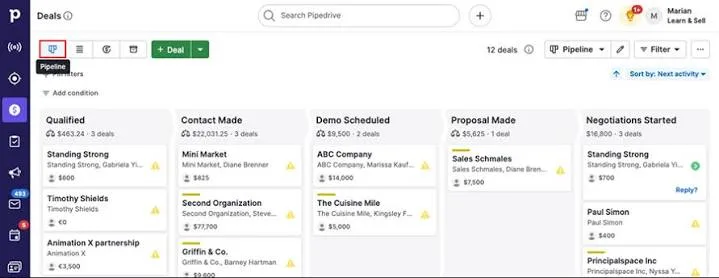
Pipedrive is one of the most consistently recommended CRMs for small businesses in 2026, and the reason is simple: it was designed for salespeople, not IT administrators. The interface centers on a visual Kanban-style pipeline where deals move through stages you define — immediately intuitive for anyone who has managed a sales process on a whiteboard.
According to Quaderno's 2026 CRM software review, Pipedrive's feature set includes customizable pipelines, an AI-powered sales assistant, task automation, centralized communication, lead generation and prioritization, and integration with over 300 third-party tools. It also offers webhooks and an open API for teams that need custom connections.
The limitations are real and worth knowing before you commit. Lower-tier Pipedrive plans restrict the number of open deals and custom fields per company — a constraint that won't matter at five people but can become a genuine bottleneck as you grow. Customer support quality has also been flagged in user reviews as inconsistent, which matters for a small team without internal IT support that needs quick answers when something breaks.
A five-person B2B sales team tracking deals through proposal, negotiation, and close stages will find Pipedrive's interface reduces administrative friction rather than adding it. If your biggest CRM problem is "deals fall through the cracks because nobody can see the full pipeline," Pipedrive is likely your answer.
HubSpot CRM: Best Free Starting Point for Budget-Conscious Small Businesses
Best for: Profile A and early Profile B — teams that want to start for free and grow into paid
Free plan: Yes — unlimited users, deal pipelines, email tracking, meeting scheduler
Starting price: Free
Key strength: Generous free tier, strong ecosystem, approachable for non-technical users
Key limitation: Significant pricing jump from free to paid plans; better automation gated behind higher tiers
HubSpot's free CRM tier is one of the most genuinely useful free products in the business software market — not a stripped-down trial designed to frustrate you into upgrading, but a functional tool that many small businesses run on indefinitely. As Sybill's 2026 CRM rankings confirm, the free plan includes unlimited users, deal pipelines, email tracking, and a meeting scheduler at no cost.
That's a meaningful package. A startup founder tracking early customer conversations, a small agency managing client relationships, or a freelancer who needs structured contact history can all operate effectively within the free tier without hitting a wall in the first month.
The honest caveat: better automation, advanced reporting, and the full marketing feature set are gated behind paid plans, which can become expensive as your needs grow. For teams that outgrow the free plan quickly, the total cost of ownership can end up higher than a mid-range paid CRM that included those features from the start.
HubSpot's longer-term value proposition is its ecosystem. It connects CRM with marketing, service, and operations tools, making it a platform you can grow into rather than grow out of. Many revenue teams in 2026 use HubSpot as their central CRM record system while supplementing with specialized tools — a sign it functions well as a hub even when it's not doing everything.
If your budget is genuinely zero right now, HubSpot's free tier is the most capable starting point available.
Zoho Bigin: Best Lightweight Option for Solopreneurs and Very Small Teams
Best for: Profile A — solo operators and 1–3 person teams who find full CRM platforms overwhelming
Free plan: Yes (also: Zoho CRM free for up to 3 users)
Starting price: Among the most affordable in the market
Key strength: Simplicity, fast setup, clear migration path to Zoho CRM as you grow
Key limitation: Not designed for complex sales processes or teams needing deep reporting
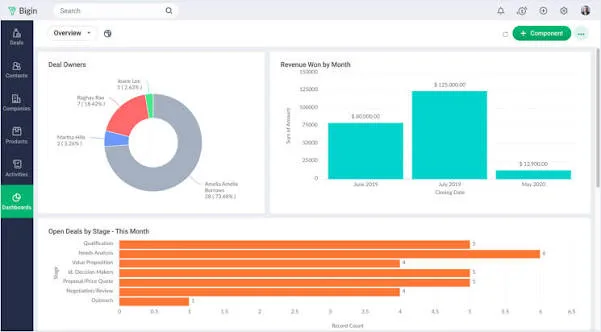
Zoho Bigin occupies a specific and underserved niche: the very small business or solopreneur who finds full CRM platforms genuinely overwhelming but needs more structure than a spreadsheet provides. Most CRM roundups skip this segment entirely. Bigin is designed specifically for it.
The product strips CRM down to its functional core — pipeline management, contact records, and basic automation — without the feature bloat that makes enterprise tools feel like a second job to maintain. A freelance photographer tracking client inquiries, proposals, and follow-ups doesn't need lead scoring or territory management. Bigin gives them exactly what they need, and nothing they don't.
The strategic advantage of Bigin within the Zoho ecosystem is the migration path it provides. As Sybill notes, Zoho CRM also offers a free tier for up to three users. Businesses that start on Bigin and grow beyond its capabilities can migrate to Zoho CRM without switching vendors — preserving data and workflows while gaining more sophisticated features. That continuity has real value. Platform migrations are disruptive and expensive.
The limitation is equally clear: Bigin is not designed for complex sales processes, teams that need deep reporting and analytics, or businesses with more than a handful of active users. It's a starting point, not a destination for a scaling team.
Freshsales: Best for AI-Assisted Lead Prioritization on a Mid-Range Budget
Best for: Profile B teams with consistent inbound lead volume who need help deciding what to work on first
Free plan: Yes (limited — no advanced reporting)
Starting price: Mid-range (Growth and Pro tiers — verify current pricing at Freshsales.io before committing)
Key strength: AI lead scoring, ease of use, contextual conversation insights
Key limitation: Fewer third-party integrations than Pipedrive or HubSpot; can slow with large databases
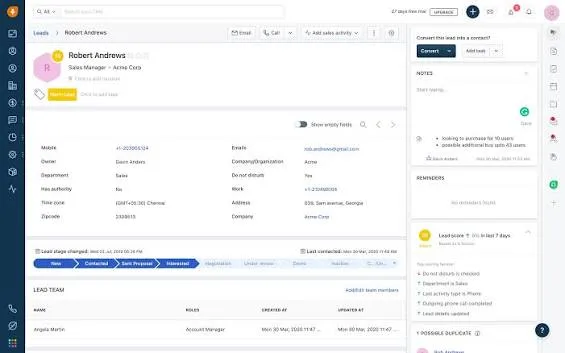
Freshsales targets the gap between basic contact management and full enterprise CRM — specifically for small businesses that have moved beyond manual contact tracking and now need intelligent help deciding which leads to prioritize. Its AI-powered features are not decorative; they are the core value proposition.
As Slack's CRM guide describes it, Freshsales focuses on lead quality, conversion growth, and productivity — helping sales teams contextualize conversations and draft outreach more efficiently. The AI lead scoring feature is particularly useful for teams with active inbound lead flows where a sales rep can't manually evaluate every inquiry. The system surfaces which leads are most likely to convert, letting the team focus limited time accordingly.
The limitations are worth flagging directly. The platform can slow down with heavily loaded databases — a real concern for businesses with large contact lists. Third-party integrations are fewer than Pipedrive or HubSpot, which may matter if your team relies on a specific tool that Freshsales doesn't natively support. Verify your key integrations before committing.
The right match: a small SaaS company, a service business with consistent lead volume, or any team where the challenge isn't finding leads — it's deciding which ones to call first.
Salesforce Starter: Best for Small Businesses Planning Significant Scale
Best for: Profile C — small businesses approaching 10+ people with complex sales cycles and a documented growth plan
Free plan: No (free trial available)
Starting price: Higher than all other options on this list
Key strength: Unmatched scalability, full feature depth, zero-regret growth path
Key limitation: Higher complexity, steeper learning curve, higher total cost of ownership
Salesforce is the most powerful CRM in this comparison — and the most frequently misapplied. It is not the right choice for most small businesses right now. It is the right choice for one specific profile: a small business with a clear and aggressive growth trajectory that wants to avoid the painful, expensive process of migrating CRM platforms when headcount doubles or triples.
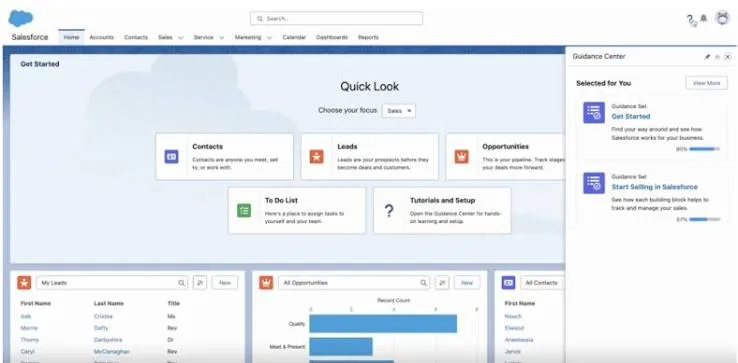
According to ZDNET's expert-reviewed CRM comparison, the Salesforce Starter package includes account, contact, task, and lead management from the outset — along with email templates, campaign assistance, automation, data analytics, and onboarding support. That's a genuinely comprehensive feature set for an entry-level tier.
Slack's CRM guide highlights that Salesforce Starter combines sales, service, commerce, and marketing tools into a single dashboard, with guided onboarding and AI-powered email optimization to lower the barrier for new users. The platform makes data import from spreadsheets or a previous CRM straightforward.
The honest trade-off: Salesforce carries a higher total cost of ownership and greater complexity than any other option here. Setup, customization, and ongoing management can be challenging without dedicated resources. For a three-person team without technical support, that complexity can become a real burden.
Sybill's framing captures it precisely: if you're planning to scale fast and never want to switch CRMs, Salesforce Essentials has a higher setup cost upfront and zero regret at 50 reps. That's the right lens. The upfront investment is higher. The long-term switching cost is zero.
Side-by-Side Comparison
| CRM | Best For | Free Plan | Key Strength | Key Limitation |
|---|---|---|---|---|
| Pipedrive | Sales-focused teams, pipeline visibility | No | Visual pipeline, 300+ integrations | Deal/field limits on lower plans |
| HubSpot CRM | Budget-conscious starters | Yes (unlimited users) | Generous free tier, strong ecosystem | Significant price jump from free to paid |
| Zoho Bigin | Solopreneurs, 1–3 person teams | Yes | Simplicity, Zoho migration path | Not suitable for complex sales |
| Freshsales | AI-assisted lead prioritization | Yes (limited) | AI lead scoring, ease of use | Fewer integrations, slower with large databases |
| Salesforce Starter | Scaling small businesses (10+) | No (trial available) | Scalability, full feature depth | Complexity, higher cost of ownership |
How This Guide Was Researched
This guide is based on manufacturer specifications, independent expert sources, and verified customer feedback aggregated from multiple review platforms. It does not reflect hands-on testing by Trusted Buyer Report. Sources include Wave Connect's 2026 CRM statistics, Nimble's CRM guide, TechRadar's small business CRM analysis, Sybill's CRM rankings, Slack's CRM guide, Quaderno's CRM review, and ZDNET's expert CRM testing. Prices and feature availability may change — verify with each vendor before purchasing.
Your Decision Framework: Which CRM Fits Your Situation?
There is no single best CRM for small businesses in 2026. There's only the best CRM for your specific profile, budget, and growth plan.
If your budget is zero and your team is small: Start with HubSpot's free plan. It's functional — not a trap. Reassess when you hit the automation ceiling.
If you're a solopreneur or a team of 1–3 with a simple pipeline: Zoho Bigin gives you structure without overwhelm. It's the fastest path from spreadsheet chaos to organized contact management.
If you have a 5-person sales team and your primary challenge is pipeline visibility: Pipedrive is the most intuitive choice. Its visual pipeline reduces friction for salespeople who resist administrative tools.
If you have consistent inbound lead volume and need help deciding who to call first: Freshsales' AI lead scoring earns its mid-range price point. Verify that your key integrations work before committing.
If you're growing fast and want to avoid a platform migration in two years: Salesforce Starter's higher upfront complexity is the cost of long-term stability. Budget for proper onboarding and you won't regret it at 50 people.
One final practical note: every platform on this list offers either a free plan or a free trial. Use it. Spend two weeks with your actual contacts, your actual deals, and your actual workflow. The right CRM will feel like it reduces administrative work. The wrong one will feel like it adds a second job.
CRM in the Context of Your Broader Business Software Stack
A CRM doesn't exist in isolation. How well it performs depends partly on how it integrates with the rest of your software stack. If you're also evaluating tools like HR and payroll software, check out our comparison of Gusto vs. ADP vs. Rippling for 2026 — several HR platforms offer native CRM integrations that can reduce double-entry for employee-facing workflows.
For businesses managing client billing alongside customer relationships, our guide to accounting software for freelancers and self-employed professionals in 2026 covers platforms with CRM-to-invoicing integrations worth evaluating before you lock in either tool.
If you're running a client-facing business that relies heavily on email outreach, our comparison of Mailchimp vs. ConvertKit vs. Klaviyo for email marketing is worth reading alongside this one — email marketing platform choice and CRM choice often need to be made in tandem, since integrations vary significantly by pairing.
And if you're evaluating your full business software spend at once, our best business software deals roundup for 2026 tracks current pricing promotions across CRM, accounting, and productivity tools — worth checking before you finalize any annual subscription.
For teams that also need project management alongside CRM, our comparison of Asana vs. Monday vs. Notion for 2026 covers the overlapping functionality between project tools and CRM platforms — useful if you're trying to avoid paying for both when one might do the job.
Frequently Asked Questions
What is the best free CRM for small businesses in 2026? HubSpot CRM offers the most capable free plan available — unlimited users, deal pipelines, email tracking, and a meeting scheduler at no cost. Zoho CRM also offers a free tier for up to three users and is worth considering if you prefer a lighter interface.
Is CRM software worth it for a solo freelancer? Yes, if you have more active client relationships than you can track mentally. Zoho Bigin or HubSpot Free both offer free plans sufficient for solo operators. The real question is whether your workflow is simple enough that a spreadsheet handles it adequately — if it does, there's no rush.
How much does CRM software typically cost for a small business? Pricing varies widely. Entry-level paid plans (like Pipedrive's Essential tier) typically start around $15–$25 per user per month. Mid-range options (like Freshsales' Growth plan) run $25–$50 per user per month. Salesforce Starter sits at the higher end of the small business range. Free options exist from HubSpot and Zoho with meaningful feature sets.
When should a small business upgrade from a free CRM to a paid plan? When you start hitting automation limits, need advanced reporting to make pipeline decisions, or find your team spending significant time on manual tasks that a paid plan would automate. The trigger is usually operational friction — not an arbitrary headcount milestone.
Can I switch CRMs later without losing my data? Yes, but it's disruptive and time-consuming. Most platforms export to CSV, and most accept CSV imports. The real cost of switching is the reconfiguration work: rebuilding pipelines, reconnecting integrations, and retraining your team. This is why platform fit matters so much at the outset.
Reviewed by the Trusted Buyer Report editorial team. This article was researched and drafted with AI assistance, then reviewed and fact-checked before publishing. We may earn a commission from purchases made through links on this page at no additional cost to you. Read our full editorial standards →