This guide is based on manufacturer specifications, independent peer-reviewed research, and aggregated expert reviews from PCMag, Wirecutter, CNET, and BGR. It does not reflect hands-on testing conducted by Trusted Buyer Report. We may earn a commission when you click links on this page — added only after our research is complete. Full disclosure →
Quick Verdict: Which Bluetooth Tracker Is Right for You?
If you only have 30 seconds: AirTag wins for iPhone users in North America, Western Europe, and Japan. Samsung SmartTag 2 is the best pick for Galaxy users, especially those in South Korea or Southeast Asia. Tile is the only option that works across both iOS and non-Samsung Android — making it the default choice for mixed households or travelers going where neither Apple nor Samsung dominates.
The reason these trackers perform so differently isn't the hardware — it's the crowd-sourced network behind each device. Keep reading to understand exactly why that matters, and which tracker's network actually covers where you live and travel.
The Hidden Variable That Determines Whether Your Tracker Actually Finds Your Stuff
Most buyers compare Bluetooth trackers on specs: range, battery life, IP rating, price. Those details matter — but they're secondary to a factor almost no review puts upfront: how many compatible smartphones are near your lost item when you need it found.
When an item goes out of your personal Bluetooth range (typically 100–400 feet), your tracker relies entirely on other people's phones to relay its location back to you. That relay happens silently and anonymously. But it only works if someone nearby has the right kind of phone — and that varies dramatically by country and city.
A peer-reviewed study published on arXiv (paper 2501.17452) tested this across thousands of real-world location reports across dozens of countries. The results are stark:
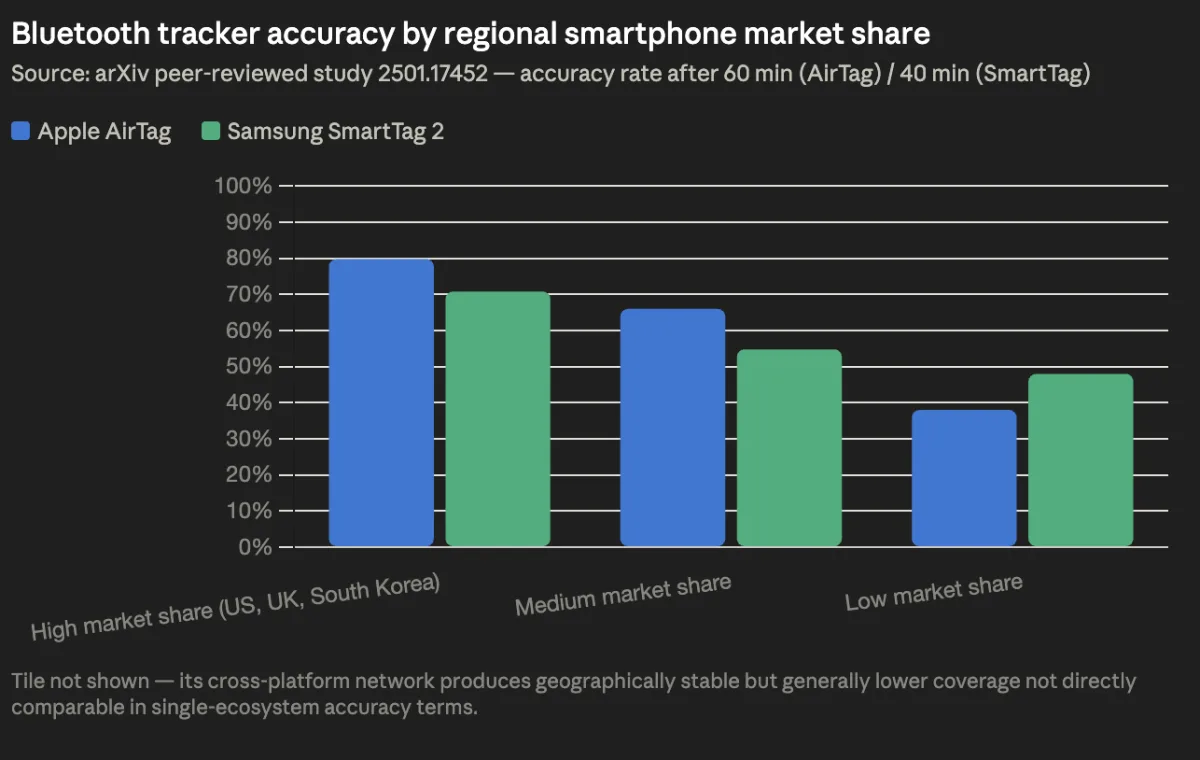
- AirTag reaches 79.8% accuracy after 60 minutes in high iPhone market share countries (US, UK, Japan, Australia). Drops to 66% in medium iPhone markets. Falls to 38% in low iPhone markets.
- Samsung SmartTag 2 reaches 70.8% accuracy within 40 minutes in high Samsung market share countries (South Korea). Falls to 54.8% in medium Samsung markets, and 48.0% in low Samsung markets.
- Tile's cross-platform network (iOS + Android) produces more geographically stable — if generally lower — coverage, because it isn't tied to a single phone ecosystem.
This is the number one thing to know before you buy. Everything else is secondary.
IMAGE TABLE: Recommended Images for This Article
| # | Suggested Unsplash/Pexels Search | Alt Text | Placement in Article |
|---|---|---|---|
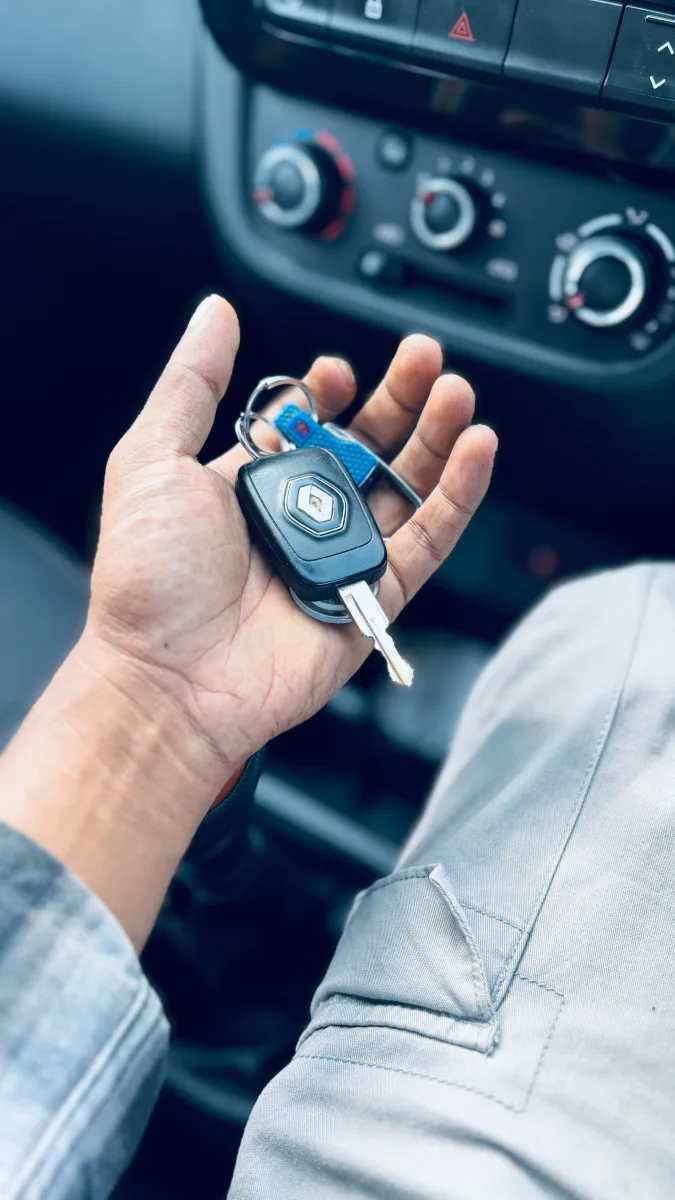
| 1 | Pexels: "keys keychain close up hand" | Person holding a set of keys with a small bluetooth tracker attached | Hero image / top of article |
| 2 | Pexels: "airport luggage suitcase conveyor belt" | Suitcases moving along an airport baggage claim belt | Section: "The Hidden Variable" |
| 3 | Pexels: "smartphone app map tracking" | Hand holding a smartphone showing a location tracking app | Section: "How Bluetooth Trackers Work" |
| 4 | Pexels: "iphone apple white minimal" | Close-up of an iPhone on a white background | Section: "Ecosystem Compatibility" |
| 5 | Pexels: "technology flat lay gadgets desk" | Flat lay of tech gadgets including earbuds and wearables on a desk | Section: "Network Reach & Accuracy Data" |
| 6 | Pexels: "lock padlock security privacy" | Close-up of a combination lock symbolizing privacy and security | Section: "Privacy and Security" |
| 7 | Pexels: "battery coin CR2032 small round" | CR2032 coin cell battery next to a small device | Section: "Battery Life & Durability" |
How Bluetooth Trackers Actually Work (And Why It's More Complicated Than You Think)
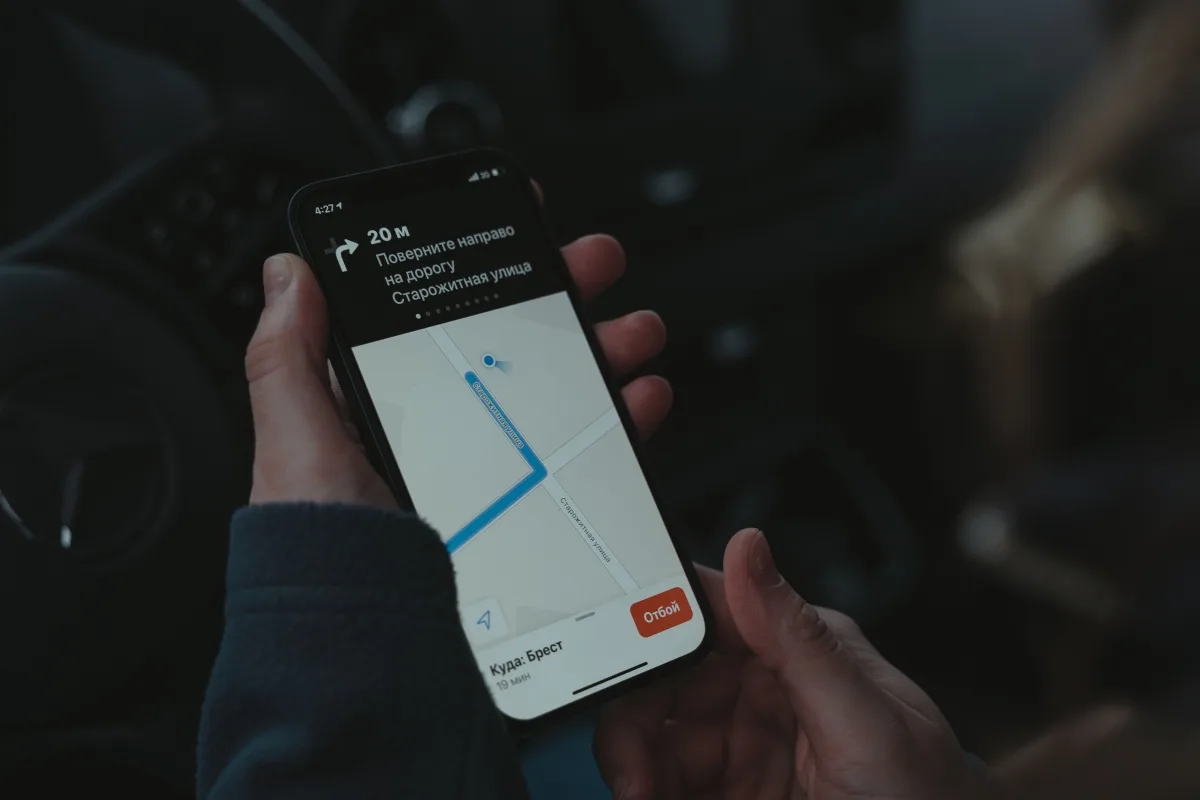
Every tracker on this list uses Bluetooth Low Energy (BLE) to communicate with your phone when you're nearby — within roughly 100 to 400 feet depending on the model and environment. That covers the "I left my keys on the coffee table" scenario without any internet required.
The capability that makes trackers genuinely useful for lost luggage, stolen bikes, or misplaced bags across town is the crowd-sourced find network. Here's how it works:
- Your bag with a tracker inside gets left behind at an airport gate.
- Your phone can no longer reach the tracker directly.
- A stranger's phone walks past your bag. It silently detects the tracker's Bluetooth signal.
- That phone encrypts the tracker's location and reports it anonymously to the tracker company's servers.
- You see a location update in your app — without knowing whose phone helped, and without them knowing they helped.
Each tracker runs on a different network:
- Apple Find My: Uses every nearby iPhone, iPad, and Mac. Estimated 1+ billion active Apple devices worldwide.
- Samsung SmartThings Find: Uses Samsung Galaxy phones running Android 9 or later with at least 3GB of RAM and SmartThings installed, per PCMag's tracker roundup.
- Tile Network: Uses both iOS and Android users — the only cross-platform option here.
Ultra-Wideband (UWB) technology adds directional precision on top of the crowd-sourced network. Where Bluetooth tells you a tracker is "nearby," UWB guides you to within centimeters using on-screen arrows and real-time distance readings. Both AirTag and SmartTag 2 support UWB. Tile does not. However, UWB Precision Finding requires compatible hardware in your phone, not just the tracker — AirTag's directional guidance requires an iPhone 11 or later, per PCMag.
Ecosystem Compatibility: The Question You Must Answer Before You Buy
What phone do you own? Answer this first. It eliminates one or two options immediately.
Apple AirTag
Requires iOS or iPadOS 14.5 or later to set up and use. Full UWB Precision Finding only works on iPhone 11 and newer. Android users can detect a nearby unknown AirTag for safety purposes, but cannot track, manage, or use any of its features.
Samsung Galaxy SmartTag 2
Works only with Samsung Galaxy phones running Android 9 or later with at least 3GB of RAM and the SmartThings app installed, confirmed by both PCMag and BGR. A Google Pixel user, a OnePlus user, or anyone on a non-Samsung Android device cannot use the SmartTag 2 at all.
Tile (Pro / Mate / Slim / Sticker)
Works natively with both iOS and all Android phones — including non-Samsung devices. According to PCMag, Tile is the only tracker on their tested list with genuine cross-platform support. If you use an iPhone and your partner uses a Pixel, Tile is your only realistic option.
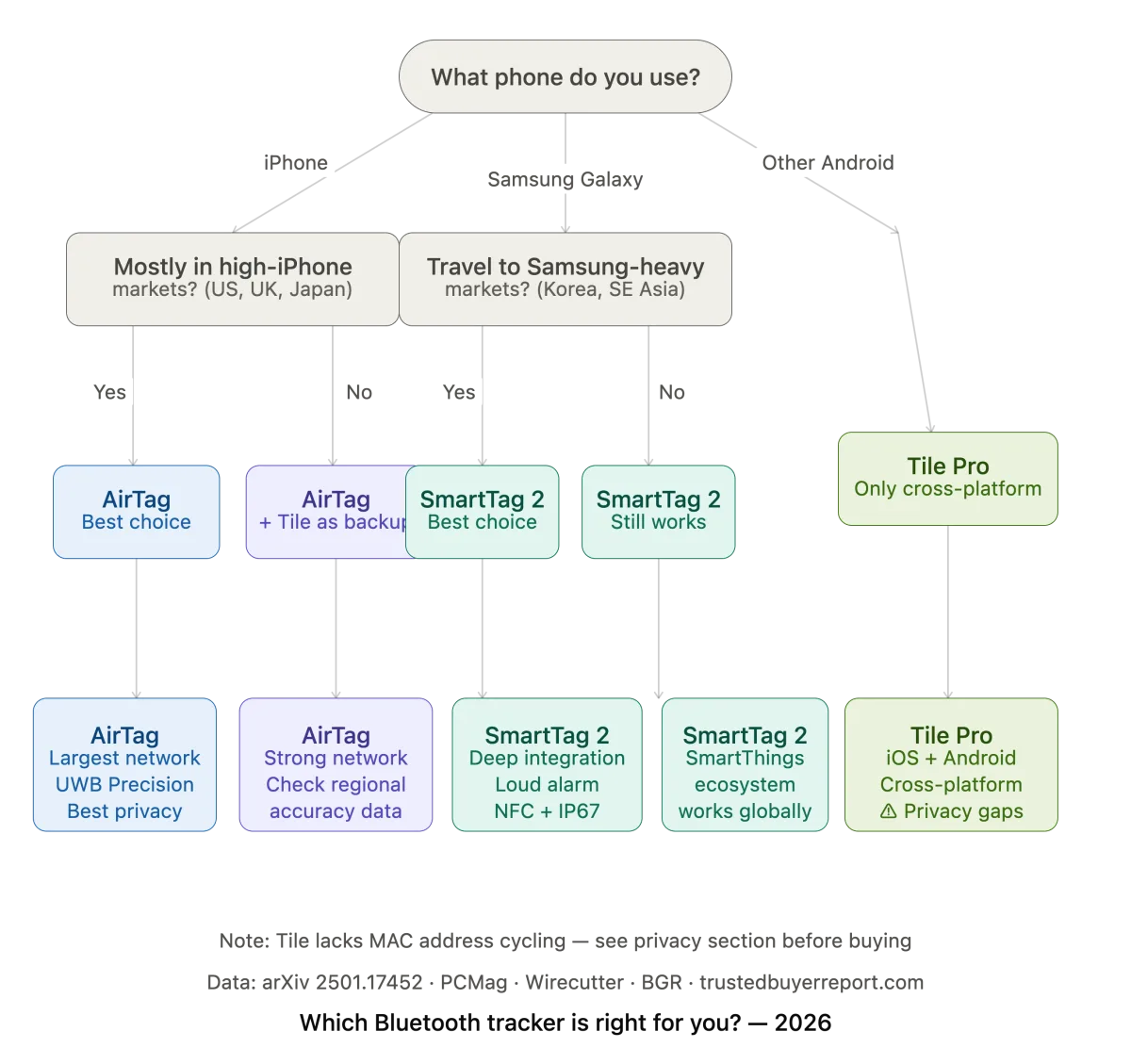
Quick Decision Tree
| Your Phone | Best Tracker |
|---|---|
| iPhone 11 or newer | AirTag (strongest network + Precision Finding) |
| Samsung Galaxy | SmartTag 2 (deepest integration, SmartThings ecosystem) |
| Non-Samsung Android (Pixel, OnePlus, etc.) | Tile (only option that works) |
| Mixed household (iPhone + Android) | Tile (cross-platform) |
| Frequent international traveler | Depends on destination — see accuracy data below |
Network Reach and Real-World Accuracy: What the Data Actually Shows
The arXiv peer-reviewed study (2501.17452) is the most rigorous independent analysis of tracker accuracy available as of 2026. It tested AirTag, SmartTag, and Tile across thousands of real-world location reports and produced median error distances, accuracy rates, and standard deviations by region. Here's what the numbers show:
Median Location Error (Lower = Better)
| Tracker | Median Error | Error Range | Std. Deviation |
|---|---|---|---|
| Tile | 17.28 m | 6.60–34.68 m | 19.7 m |
| Apple AirTag | 22.02 m | 10.0–48.56 m | 36.15 m |
| Samsung SmartTag 2 | 22.82 m | 11.38–45.8 m | 11.7 m |
Tile actually had the lowest median error in this dataset. But the standard deviation figures tell a more nuanced story: SmartTag 2's much tighter standard deviation (11.7 m) suggests more consistent, predictable accuracy when it does get a location fix — fewer wild swings to 48+ meter errors.
Accuracy by Regional Market Share (60 Minutes After Loss)
| Region Type | AirTag | Samsung SmartTag 2 |
|---|---|---|
| High iPhone/Samsung market share | 79.8% | 70.8% (at 40 min) |
| Medium market share | 66% | 54.8% |
| Low market share | 38% | 48.0% |
Key insight: In cities where iPhones are everywhere — New York, London, Tokyo, Sydney — AirTag's network advantage is decisive. In markets where neither Apple nor Samsung dominates, Tile's cross-platform reach may actually outperform both despite a smaller total network.
Precision Finding: UWB, Directional Arrows, and the Last 30 Feet
Knowing your bag is "within 25 meters" gets you to the right block. Being guided to within centimeters with a directional arrow gets you to the item. That's the practical difference UWB makes.
AirTag Precision Finding (iPhone 11+): Real-time on-screen arrow + distance counter, updates as you move. Guides you to within a few inches. Useful for keys under couch cushions, bags in overhead bins, wallets in cluttered rooms.
Samsung SmartTag 2 Precision Finding (compatible Galaxy devices): Works through the SmartThings app with similar UWB directional precision to AirTag.
Tile: Relies on Bluetooth signal strength only — shows a hot/cold proximity indicator as you move closer or farther from the tracker. No directional guidance. In a large open space this matters less; in a multi-floor building or dense environment, the difference is significant.
Two Areas Where SmartTag 2 Has a Clear Edge
- Louder alarm: According to eufy's side-by-side comparison, SmartTag 2's alarm is noticeably louder than AirTag's. In a noisy environment — a busy airport terminal, a kitchen, a construction site — this reduces the chance of walking past a tracker you can't hear.
- NFC contact sharing: SmartTag 2 supports NFC. If someone finds your keys or your pet's collar, they can tap any NFC-enabled phone against the tag to see your contact information — no app download required. AirTag does not offer equivalent NFC-based contact sharing.
Privacy and Security: The Most Overlooked Difference Between These Trackers
This is where the trackers diverge most significantly — and where the stakes are highest.
AirTag
Apple's Find My network uses end-to-end encryption for all location reports. Apple itself cannot read the data relayed through its network. AirTag devices cycle their Bluetooth MAC addresses, which prevents third parties from using the tracker's broadcast signal to track the owner's movements over time. Per Wirecutter's analysis, this design means that even law enforcement cannot compel Apple to reveal a specific AirTag's location history — because Apple doesn't have access to it.
AirTag also alerts any iPhone user if an unknown AirTag has been detected traveling with them — a meaningful anti-stalking safeguard.
Samsung SmartTag 2
Operates with comparable privacy-by-design principles to AirTag within its ecosystem, with similar technical safeguards and anti-stalking alerts for Galaxy users.
Tile
Tile's privacy posture is materially weaker, and the gap has real consequences.
Wirecutter explicitly flagged two issues in its current review:
- Tile devices do not cycle their MAC addresses, which creates a vector for tracking the owner over time, not just locating the lost item.
- Tile retains the ability to access location data reported through its network.
Wirecutter cited a Wired investigation confirming these issues and no longer recommends the Tile Pro for privacy-conscious users. That's a significant position from one of the most rigorous consumer tech outlets.
Bottom line on privacy: AirTag and SmartTag 2 have structurally stronger privacy protections. If this matters to your purchasing decision — or if you're concerned about a tracker being used to monitor someone without consent — Tile is the weakest option here, despite its compatibility advantage.
Battery Life, Durability, and the Full Cost of Ownership
A tracker you buy today should serve you for years. Battery design and durability ratings determine whether that's realistic.
Battery Comparison
| Tracker | Battery Type | User-Replaceable? | Notes |
|---|---|---|---|
| Apple AirTag | CR2032 coin cell | ✅ Yes | ~1 year; widely available, swap in under 1 minute |
| Samsung SmartTag 2 | CR2032 coin cell | ✅ Yes | Noted by reviewers for longer life than AirTag |
| Tile Pro | CR2032 coin cell | ✅ Yes | Full ownership flexibility |
| Tile Mate / Slim / Sticker | Built-in | ❌ No | ~3 year lifespan, then full device replacement |
The Tile Mate, Slim, and Sticker have non-replaceable batteries, per PCMag. When the battery dies — typically around year three — the entire device becomes waste. For budget buyers who choose the Tile Mate as an entry point, this means planning a full replacement every three years, not a 30-cent battery swap. It's also a meaningful environmental concern; if sustainability factors into your purchasing decisions, AirTag, SmartTag 2, and Tile Pro are the responsible options.
Durability
Both AirTag and SmartTag 2 carry IP67 ratings — dust-tight and waterproof to 1 meter for 30 minutes, per BGR. Dropping either in a puddle, a sink, or a rain-soaked bag isn't a concern. Tile's water resistance varies by model (Slim and Sticker are waterproof; Mate is water-resistant only).
Hidden Cost: AirTag Accessories
AirTag ships as a bare disc — no attachment loop, no keychain hole. To clip it to keys or attach it to a bag, you need to buy a separate holder. Apple's own loop is extra; third-party cases range from a few dollars to premium leather options that cost more than the tracker itself. Factor this into your budget. SmartTag 2 and Tile models include a built-in loop or keychain hole.
Price Comparison: What You Actually Pay Per Tracker (and Over Time)
| Tracker | Single Unit | 4-Pack | Battery | Attachment |
|---|---|---|---|---|
| Apple AirTag | ~$29 | ~$99 (~$24.75/unit) | Replaceable CR2032 | Not included |
| Samsung SmartTag 2 | ~$29.99 | Varies | Replaceable | Built-in loop |
| Tile Pro | ~$34.99 | Available | Replaceable CR2032 | Keychain hole |
| Tile Mate | ~$24.99 | Available | Non-replaceable | Keychain hole |
Prices sourced from manufacturer sites and major retailers as of mid-2026. Check current pricing before purchasing.
AirTag's 4-pack brings the per-unit cost to roughly $24.75 — the best multi-item value on this list if you're equipping a household with iPhone users. SmartTag 2 is comparable for a single tracker. Tile Mate's lower entry price is undercut over time by the non-replaceable battery replacement cycle.
How to Choose: A Decision Framework That Matches Your Real Situation
There's no universally best Bluetooth tracker in 2026. The right choice depends on four variables: your phone, where you live and travel, your privacy tolerance, and whether you need precision close-range finding or long-range network coverage.
Choose AirTag if:
You use an iPhone 11 or newer, you spend most of your time in North America, Western Europe, Japan, or Australia (high iPhone market share), and you want the largest crowd-sourced network available. AirTag's privacy protections are strong, its UWB Precision Finding is the most refined for iPhone users, and the 4-pack pricing is the best multi-item value in an all-Apple household.
Choose Samsung SmartTag 2 if:
You use a Samsung Galaxy device, you want deep SmartThings integration, and you value a built-in loop, IP67 waterproofing, a louder alarm, and NFC contact sharing. In Samsung-dominant markets, its network accuracy is competitive with AirTag. Its tighter location standard deviation (11.7 m vs AirTag's 36.15 m) suggests more consistent fixes when it does connect.
Choose Tile Pro if:
You use a non-Samsung Android phone, you live in a mixed-ecosystem household (iPhone + non-Samsung Android), or you travel frequently to regions where neither Apple nor Samsung dominates. Tile's cross-platform network is its defining advantage. Just be aware of the privacy limitations — Wirecutter no longer recommends Tile for privacy-sensitive users, and the MAC address cycling gap is a real concern.
Avoid Tile Mate, Slim, or Sticker if:
You plan to keep your tracker for more than three years. The non-replaceable battery guarantees a full device replacement cycle — not just a battery swap.
For International Travelers:
Check the smartphone market share of the regions you visit most. Statcounter GlobalStats provides up-to-date device market share by country. If iPhones dominate, AirTag wins. If Samsung dominates, SmartTag 2 is competitive. If neither does, Tile's cross-platform reach may serve you better.
Frequently Asked Questions
Can I use an AirTag with an Android phone? No. AirTag requires iOS or iPadOS 14.5 or later to set up and use. Android users can detect a nearby unknown AirTag for safety/anti-stalking purposes using Apple's NFC detection tool, but cannot track, manage, or use any of its features.
Does Samsung SmartTag 2 work with Google Pixel or OnePlus phones? No. SmartTag 2 works exclusively with Samsung Galaxy phones running Android 9 or later with at least 3GB of RAM and the SmartThings app installed. Non-Samsung Android users should use Tile.
What's the range of these trackers? All three use Bluetooth Low Energy, with typical direct ranges of 100–400 feet depending on environment. The more important number for real-world use is the crowd-sourced network accuracy, covered in detail in the section above.
Which tracker is safest to use — no risk of being tracked by someone else? AirTag and SmartTag 2 both cycle their Bluetooth MAC addresses, preventing passive tracking of the owner. Both also alert users if an unknown tracker is detected traveling with them. Tile does not cycle MAC addresses, which is a meaningful privacy gap for some users. Apple's AirTag alerts are available on iOS; Samsung's alerts work within the Samsung ecosystem.
Can I track multiple items with one account? Yes — all three services support multiple trackers per account. AirTag supports up to 16 per Apple ID. SmartTag 2 support varies by Samsung account. Tile supports multiple trackers on a single account.
Do I need a subscription for any of these? AirTag and SmartTag 2 have no subscription requirements. Tile offers a free tier (basic functionality) and a paid Tile Premium plan that unlocks extended location history, smart alerts, and other features.
Related Buying Guides from Trusted Buyer Report
If you're building out your tech setup, these guides cover the rest of the consumer electronics landscape:
- Our 2026 Consumer Electronics Buyer's Guide is the starting point for the full category, covering how to prioritize purchases across all major tech segments.
- For audio, see our comparison of the best wireless earbuds in 2026 (AirPods vs Sony vs Samsung) and the best over-ear headphones and noise-canceling headphones in 2026.
- For mobile devices, our best tablets guide (iPad vs Samsung vs Amazon Fire) covers the full mid-to-premium tablet market.
- For portable power, our best portable chargers and power banks guide pairs naturally with travel tracker use — keeping your phone alive means the crowd-sourced relay network keeps working.
- For workspace peripherals: best PC monitors · best mechanical keyboards · best webcams for remote work and streaming · best external hard drives and SSDs · best home printers.
- For reading and hobbies: best e-readers (Kindle vs Kobo vs Nook) · best photography equipment for hobbyists.
Reviewed by the Trusted Buyer Report editorial team. This article was drafted with AI assistance and fact-checked by a human before publishing. Trusted Buyer Report may earn a commission from purchases made through links on this page — added only after our research and scoring are complete. Review methodology · Affiliate disclosure · AI ethics policy