Most parents who end up unhappy with their baby monitor didn't buy a bad product. They bought the wrong type of product for how their household actually functions. This guide fixes that by helping you match monitor category to your real life first — then comparing specific models.
The baby monitor market in 2026 breaks into five distinct categories with genuinely different trade-offs. According to Strategic Market Research, the global smart baby monitor market was valued at USD 1.4 billion in 2024 and is projected to reach USD 2.8 billion by 2030, growing at a 12.3% CAGR. More models, more confusion — and more ways to spend $200+ on something that frustrates you at 3 a.m.
Here's the short answer before the long one: if you need remote access from outside the home, buy a WiFi or smart monitor. If you value privacy and simplicity above all else, buy a dedicated local-video unit. If you genuinely can't decide, a hybrid gives you both — and that's often the smartest call.
We don't do hands-on lab testing at Trusted Buyer Report. This guide is built on synthesized data from Wirecutter, PCMag, Consumer Reports, Forbes Vetted, and MadeForMums, combined with manufacturer specs and verified buyer feedback. Read how we research →
We may earn a commission when you use our links to make a purchase, at no extra cost to you.
The 5 Types of Baby Monitors in 2026 (And What Sets Each Apart)
Understanding the technology behind each category makes every product comparison easier to interpret. Skip this section and you'll end up comparing specs that don't matter to your situation.
1. Dedicated Local-Video Monitors
These transmit video and audio from a nursery camera to a handheld parent unit over a closed, proprietary wireless signal. No internet connection required. No smartphone app. No subscription. The nursery footage never touches a server — it goes straight from camera to parent unit inside your home.
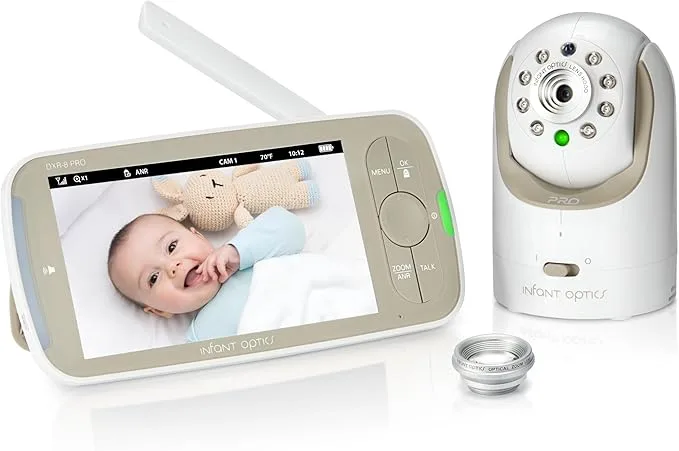
The Infant Optics DXR-8 Pro is the canonical example in this category. As PCMag notes, it has no WiFi connection, no app, and no subscription fees. For parents who are subscription-averse or genuinely concerned about data privacy — your baby's room being live-streamed through a manufacturer's cloud — this architecture is a meaningful advantage, not a limitation.
Best for: parents who want reliability, zero subscription cost, and no privacy concerns.
Not for: anyone who needs to check the nursery from outside the home.
2. WiFi App-Based Monitors
These connect through your home network and stream video to a smartphone app, typically routing footage through the manufacturer's servers before reaching your phone. The core advantage is true remote access — you can check the nursery from your office, a different floor, or another city entirely.
The trade-offs are real and often underestimated. Many models require or heavily upsell subscriptions for cloud storage and AI features. Connection reliability depends entirely on your home WiFi quality. And as Consumer Reports points out, the video feed passes through the internet and a manufacturer's server before reaching you — a pipeline with more failure points than a closed local link.
Best for: parents who travel, work from a separate floor, or have a co-parent checking in remotely.
Not for: households with spotty WiFi or parents who don't want nursery footage on a third-party server.
3. Hybrid Monitors
Hybrid monitors offer both a dedicated parent unit and WiFi app connectivity in the same device. As MacroBaby frames it, this is "a middle ground that makes a lot of sense for many families" — you get dedicated-screen reliability for nighttime use and app access for daytime flexibility. If your WiFi drops overnight, the dedicated screen keeps working. Consumer Reports categorizes these as monitors with a genuine offline mode, giving families a real fallback.
Best for: parents who genuinely use both modes — and for anyone who is uncertain between dedicated and WiFi.
Not for: parents who want the cheapest option; hybrids typically cost more.
4. Smart Monitors
Smart monitors layer AI-powered features on top of video and audio: sleep pattern analysis, breathing motion detection, room temperature and humidity monitoring, air quality sensing, and sound classification. This is the fastest-growing segment, per Strategic Market Research, and it also carries the highest upfront prices and the most complex subscription structures in the category.
Best for: data-driven parents who will actively engage with sleep analytics and breathing alerts.
Not for: parents who will primarily use the video feed and ignore the analytics dashboards.
5. Audio-Only Monitors
A legitimately valid category that buying guides routinely underserve. Wirecutter tested the IKEA Undvika — it vibrates when the baby makes noise and charges in a nesting base. For parents in small apartments, parents who find video monitoring anxiety-inducing, or households where audio is genuinely sufficient, this remains the simplest and cheapest path.
Best for: small living spaces, simplicity-focused families, parents with video-monitoring anxiety.
Not for: anyone who needs visual confirmation of what a sound means.
Six Questions That Tell You Which Type to Buy

Work through these before you look at a single product listing. Your answers will eliminate at least one or two categories entirely.
1. Do you need to check the nursery from outside the home?
If yes — for work travel, remote co-parenting, or simply wanting app access from the backyard — you need a WiFi or smart monitor. A dedicated local-video unit physically cannot do this.
2. Does your phone already feel overwhelming?
MacroBaby makes a point that sounds small but matters at 3 a.m.: some parents want the nursery monitor completely separate from their phone — separate device, separate notification stream, no overlap with work emails. A dedicated parent unit delivers that. If you're already drowning in phone alerts, adding nursery notifications to the same device often leads to notification blindness.
3. Are you subscription-averse or privacy-conscious?
A closed local-video monitor eliminates both concerns entirely. No monthly fee. No server. No account. If either factor matters to you, start with dedicated monitors.
4. How reliable is your home WiFi in the nursery?
This matters more than most guides acknowledge. Forbes Vetted found that the Eufy Baby SpaceView Pro E210 lost its connection when moving between rooms in an apartment — a real-world failure no spec sheet predicts. If your WiFi has dead zones or regularly drops, a WiFi-dependent monitor will frustrate you regardless of its other features.
5. Do you want sleep tracking, breathing alerts, or air quality data?
Only smart monitors deliver these without requiring a separate wearable. If you want data-driven insight into your baby's sleep patterns, budget for a smart monitor — and budget separately for the subscription that typically unlocks the most useful analytics.
6. What is your realistic total cost over 12–24 months?
A smart monitor at $250 upfront plus $10/month in subscription costs over $490 over two years. A dedicated local-video monitor at $150 with no subscription costs $150 total. Eufy's published buying framework specifically flags subscription costs as the most consistently underestimated factor in baby monitor comparisons.
Best Dedicated Local-Video Baby Monitors in 2026
If your answers above point toward a dedicated unit — reliability, no subscription, a device separate from your phone — two models stand out based on third-party testing data.
VTech VM919HD — Best for Large-Screen Viewing
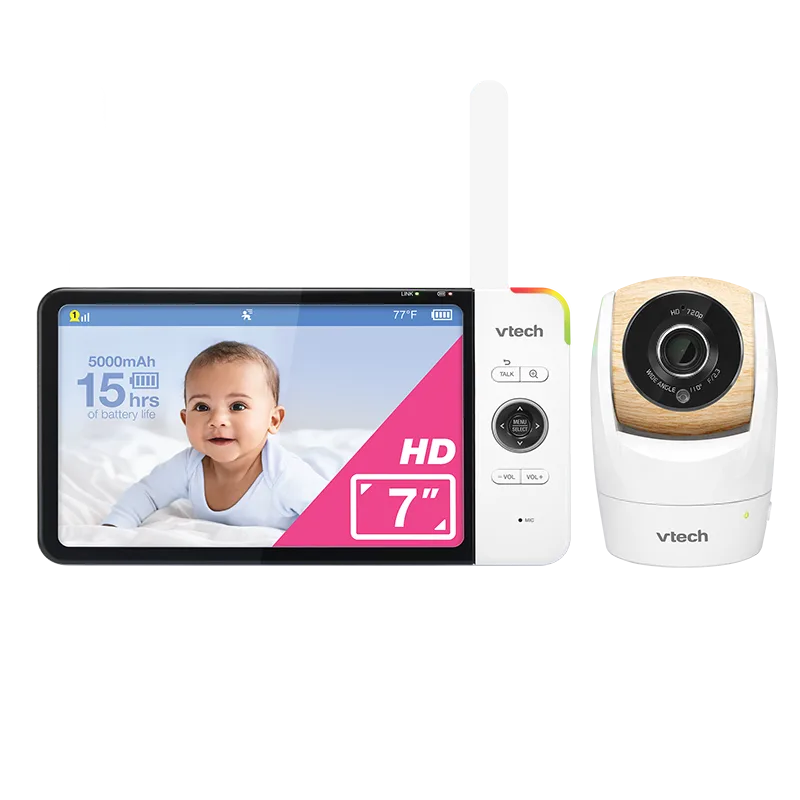
Wirecutter recommends the VTech VM919HD for parents who prioritize a large display. The 7-inch screen lets you read the nursery from across a bedroom without picking up the unit — meaningful at 3 a.m. when you're trying not to fully wake yourself. The 720p camera supports remote pan and tilt with a 270-degree rotation that achieves a near-360-degree panoramic sweep, which becomes genuinely important once a baby starts rolling and moving around the crib.
In Wirecutter's time-lapse battery-life testing — conducted under real-world conditions rather than manufacturer ideal-condition claims — the VM919HD lasted 12 hours 35 minutes, putting it competitive with other models in this category.
One specific finding worth noting: the indicator light that signals baby noise is less bright than the display itself. That's a small detail until you're trying to monitor a sleeping baby in a dark room without flooding the space with light every time you check.
The trade-off: you cannot purchase a second camera from a different brand for multi-room setups — the system is proprietary.
Estimated price: ~$169–$199
Infant Optics DXR-8 Pro — Best for Subscription-Free Simplicity
PCMag recommends the Infant Optics DXR-8 Pro for subscription-averse parents. It runs on a closed proprietary wireless link with no WiFi, no app, no internet connection required. PCMag describes it as simple to set up, clear in both daylight and low-light conditions, with effective noise reduction that filters ambient sound so you focus on what actually matters.
Per Eufy's spec comparison, the DXR-8 Pro offers 720p resolution, a 5-inch display, and an open-field range advertised at up to 1,000 feet — though real-world in-home range through walls and floors will be meaningfully lower, as with all dedicated monitors.
The trade-off: no remote access, no app, no smart features. What you gain is a monitor that works the same way every night without software updates, server outages, or subscription renewals.
Estimated price: ~$129–$159
Best WiFi & Hybrid Baby Monitors in 2026
WiFi monitors earn their place when remote access is a genuine need — not just a theoretical convenience. If you regularly work from a different floor, travel, or want a co-parent to check in remotely, a dedicated unit simply cannot serve you.
The most important real-world factor for WiFi monitors is connection stability, not resolution or feature count. Forbes Vetted's experience with the Eufy SpaceView Pro losing its signal between apartment rooms is the clearest cautionary data point: a monitor that drops when you walk to the kitchen has failed at its core job, regardless of its app's feature count.
Consumer Reports found that notification customization was one of the features that most meaningfully improved the WiFi monitor experience. Testers appreciated monitors that could distinguish between a cough and a cry, and that let them select exactly which alerts they received. Notification fatigue — your phone buzzing every few minutes for normal sleep sounds — leads parents to mute notifications entirely, which defeats the purpose.
Privacy is a real consideration with any WiFi monitor. Video routed through manufacturer servers carries inherent data risks that a closed local-video system doesn't. Before purchasing, review the manufacturer's data storage policy, encryption standards, and whether footage is actually purged when you delete it. PCMag notes that smart internet-connected monitors often carry high upfront costs plus recurring subscription fees — factor both into your 24-month total.
For parents genuinely uncertain between WiFi and dedicated: a hybrid monitor is usually the right answer rather than a compromise. You get the dedicated screen for overnight use and the app for daytime or remote access. If WiFi drops, the screen keeps working.
Best Smart Baby Monitors in 2026
Smart monitors are the most marketed and most misunderstood segment. The features sound compelling — real-time sleep analysis, breathing motion detection, air quality alerts, sound classification. The honest question is whether those features deliver value in your specific situation, or whether you're paying for dashboards you'll check twice and then ignore.
Nanit Pro — Best for Sleep Tracking
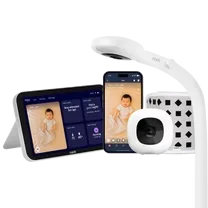
The Nanit Pro is the most widely cited smart monitor across testing sources for sleep analytics and breathing motion detection. Breathing monitoring is achieved through a wearable band on the baby's clothing, not a contact sensor — a meaningful distinction from monitors that require a separate dedicated wearable device. Sleep data is detailed and genuinely actionable for parents who want to understand patterns rather than just react to individual wake-ups.
The honest caveat: the subscription cost for full analytics access is a real budget line item, not a minor add-on. Calculate your 24-month total before purchasing.
Philips Avent Premium Connected — Proceed With Caution
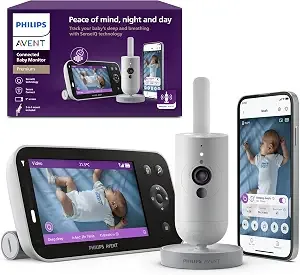
Forbes Vetted rated the Philips Avent Premium Connected 3 out of 5 stars, and the specific findings from their hands-on testing are worth reading carefully before purchasing. The monitor offers sleep and breathing tracking without requiring an additional wearable, and it has a higher-resolution camera than several competitors.
However, the Forbes Vetted tester found the parent unit would not turn on the second day of use despite being charged overnight. When functioning, it was slow to power on. The camera also produces persistent fish-eye distortion visible on both the app and the parent unit — not a setup issue, but an inherent image quality limitation. For a premium-priced monitor, those are significant reliability concerns.
LeapFrog LF4917 7-inch Smart Video Baby Monitor — Best Color Night Vision
MadeForMums parent tester Steph specifically called out the LeapFrog LF4917's color night vision as a genuine differentiator: it makes it easier to assess a baby's skin color and condition in low light, which standard infrared monochrome imaging can't do. The review also highlighted excellent image quality, sensitive audio, remote access, and an accurate temperature sensor as standout features.
Color night vision — as opposed to standard infrared black-and-white — is one of the few "smart features" that provides practical value beyond what simpler monitors offer.
The honest caveat for the entire smart category: these devices add cost and complexity. If you find yourself primarily using the video feed and audio alert, a simpler monitor at a lower price will serve you just as well. Smart features earn their cost when you actively engage with the data they provide.
Which Baby Monitor Specs Actually Matter (And Which Are Overhyped)
Spec sheets are written to impress, not to inform. Here's what testing data actually shows about which numbers translate to real-world value — and which don't.
Resolution: 720p is usually enough.
Eufy's buying framework makes this directly: stable, usable video is typically more valuable than headline resolution. Forbes Vetted noted the Eufy SpaceView Pro's 720p was limiting compared to newer options — but the connection reliability problem was the more damaging real-world issue.
Night vision: the "HD" label means very little.
What matters is actual low-light image quality, not the label. Color night vision (as on the LeapFrog LF4917) provides meaningfully more information than standard infrared monochrome — you can assess skin color, which matters for parents monitoring for symptoms.
Range: always lower than advertised.
Open-field range figures like the Infant Optics DXR-8 Pro's 1,000-foot claim are measured in ideal conditions with no walls or interference. What matters is whether the connection remains stable through your actual home layout — particularly thick walls, multiple floors, or concrete construction.
Battery life: manufacturer claims vs. real-world testing.
Wirecutter's time-lapse battery testing produces more realistic comparisons than manufacturer specs. The VTech VM919HD's 12 hours 35 minutes result was measured under real-world conditions — use that as your baseline, not the packaging number.
Pan and tilt: matters more as the baby grows.
Remote pan and tilt becomes genuinely useful once a baby starts rolling and moving around the crib. A fixed-angle camera requires you to physically reposition it as the baby develops.
Display size: a 7-inch screen is a real advantage at night.
The VTech VM919HD's 7-inch display is specifically called out by Wirecutter as a meaningful advantage — it lets you read the nursery from across a room without picking up the unit, which reduces how much you disturb your own sleep to check on the baby.
Baby Monitor Privacy & Security: What You Should Know Before Connecting to WiFi
WiFi baby monitors introduce a category of risk that dedicated local-video monitors don't: your nursery footage is transmitted over the internet, typically through manufacturer servers, before reaching your phone. That pipeline has multiple potential vulnerability points — your router, the manufacturer's server infrastructure, and the app itself.
Before purchasing any WiFi-connected monitor, ask:
- Does the device use end-to-end encryption for video transmission?
- Where is footage stored, and for how long?
- Does the manufacturer have a published history of security incidents?
- Can you delete stored footage — and is it actually purged from servers when you do?
- Does the monitor require two-factor authentication for app login?
Practical security steps for any WiFi monitor:
- Use a strong, unique password for the monitor's app account
- Enable two-factor authentication if the app supports it
- Keep device firmware updated
- Place the monitor on a separate guest network if your router supports it — this limits what the device can access if it's ever compromised
For maximum privacy: a closed local-video monitor like the Infant Optics DXR-8 Pro eliminates server-side risk entirely. There is no account to breach, no server to compromise, and no subscription to cancel if the company changes its data practices.
How Baby Monitors Fit Into Your Broader Nursery Setup
A baby monitor is one piece of a larger nursery ecosystem. If you're still building out the room, the best nursery furniture sets of 2026 covers cribs, dressers, and gliders — the monitor placement decisions (wall mount vs. freestanding, camera height) often depend on which furniture layout you choose.
If you're researching the full range of baby gear, the Baby & Kids Product Reviews and Safety Guides 2026 is a good starting point for understanding what's tested, what's overhyped, and where safety certifications actually matter.
For parents thinking ahead, the best baby clothing brands of 2026 and best baby food brands of 2026 cover two categories where decisions come up fast once your baby starts growing.
Frequently Asked Questions
Do I need a baby monitor if I live in a small apartment?
Not necessarily. In a studio or one-bedroom apartment, you may be close enough to hear your baby without any monitor. An audio-only monitor like the IKEA Undvika — tested by Wirecutter — may be sufficient. Video monitors add value when you want visual confirmation of what a sound means, or when you're in a room where ambient noise makes hearing difficult.
Are smart baby monitors worth the subscription cost?
It depends on whether you'll actively use the analytics. Sleep tracking and breathing motion alerts provide real value for parents who want data-driven insight into their baby's patterns. If you primarily watch the video feed and respond to sound alerts, a simpler monitor at a lower total cost will serve you equally well. Calculate the 24-month total — upfront cost plus monthly subscription — before comparing "affordable" smart monitors to higher-priced dedicated units.
How long do you need a baby monitor?
Most parents find baby monitors most useful from birth through 18–24 months, though some continue using them until age 3 or beyond. For parents planning more than one child, the total useful life of a durable monitor extends significantly — the Infant Optics DXR-8 Pro, for example, is frequently cited for its longevity across multiple children.
Can a baby monitor be hacked?
WiFi-connected monitors can be vulnerable if proper security practices aren't followed. Using strong, unique passwords, enabling two-factor authentication, and keeping firmware updated significantly reduces risk. Dedicated local-video monitors like the DXR-8 Pro have no server-side exposure — there's nothing to hack remotely because there's no internet connection.
What's the best baby monitor for twins or multiple rooms?
Look for systems that support multiple cameras on a single parent unit, with split-screen or channel-switching capability. Some dedicated monitor systems (like the VTech VM919HD) support additional cameras through the same proprietary system. WiFi systems with multi-camera support are also an option, though each additional camera may require its own subscription slot.
Should I choose video or audio baby monitor for nighttime use?
Most parents who use video monitors find themselves primarily relying on the audio alert at night and checking video only when they hear something concerning. If your main use case is nighttime alert, an audio monitor is often sufficient. If you want to visually assess the situation before getting up — particularly valuable once a baby starts rolling or sitting up — a video monitor earns its extra cost.
This guide was researched and drafted with AI assistance, then reviewed and fact-checked before publishing. Recommendations are based on synthesized data from Wirecutter, PCMag, Consumer Reports, Forbes Vetted, and MadeForMums — we do not conduct hands-on product testing. How we research → · We may earn a commission when you use our links to make a purchase.